 Main Menu | Advanced Income Shock | Back Testing | Review
The Review tab provides a comparison of the default Back Test set selected in the Sets tab to the historical and current projections.
Comparison data can be displayed in each of the following areas for any projection period:
| • | By a specific Shock scenario. |
| • | By a specific G/L account in the tree view on the left. |
| • | Data can be displayed by Average or Ending balances. |
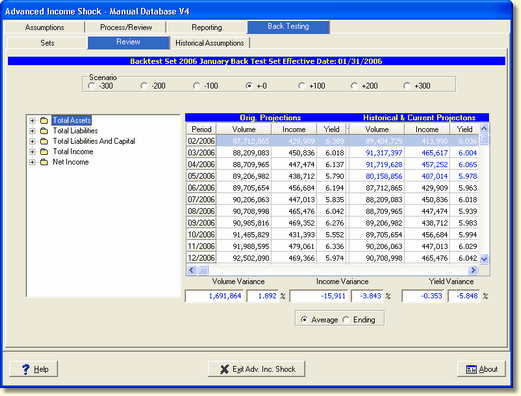
The system provides dollar and percent variances for volume, income and yield. As each account and projection period is selected, the variance fields at the bottom of the screen are populated with the appropriate variances.
In the grid, data displayed in blue are historical (actual). Data displayed in black are projections.
Find Account By Description
This tool will help the user quickly find a specific account in their chart of accounts, based on the account's description in the model. In any screen which displays the Chart of Accounts, right click on the chart. There will be an option on the popup menu, "Find Account by Description". The location of the option on the popup menu will vary, due to other options available in the selected screen. This tool is found in the various modules of the IRR-Solutions® II system.
By right clicking on the chart and selecting Find Account By Description the following screen will be displayed.
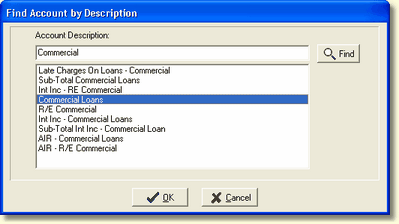
Account Description - A dialog box will appear which will allow the user to type in all, or part of the description for the account. Clicking the Find button will display all accounts containing the description typed. Subtotal accounts will be displayed as well as accounts.
In the above example, the text to be searched for can appear anywhere in the description. Select the account from the list of accounts and click the OK button. The Chart of Accounts will automatically expand and highlight the selection as shown below.
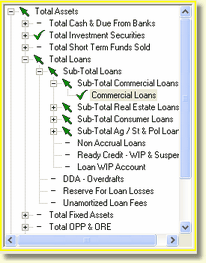
This tool allows the user to go directly to a specific account or subtotal account in the chart, and should save time and effort to locate specific accounts the user wants to work with and/or review.
In addition to viewing a comparison on screen, two reports provide Back Test comparison data. See Back Testing Financial Statement Variance and Back Testing Yield Variance reports for a description of each report.