The Input Sheet displays the date status of all required data for the Liquidity reporting and whether it is up-to-date and all necessary processing has been performed. If any item is out-of-date, a red question mark will be displayed next to the item. All up-to-date items will display a green check mark.
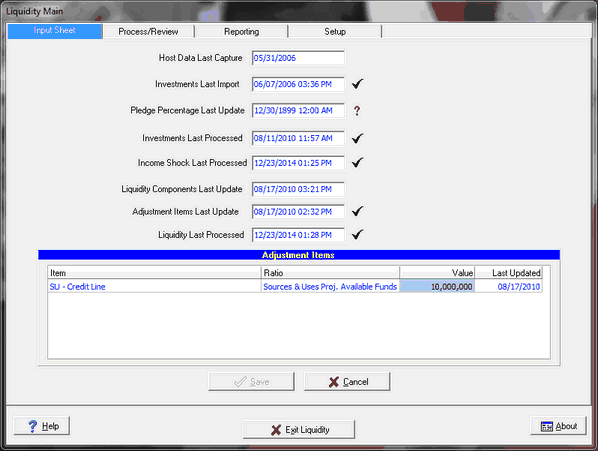
Host Data Last Capture - Current month end processing date
Investments Last Import - The Liquidity and Dependency ratios rely heavily on the current security information therefore, the last security import is checked.
Pledge Percentage Last Update - In order for the Liquidity and Dependency ratios to properly compute security volumes, the pledge percentage of a security must be entered. Pledged volumes cannot be counted as part of your liquid assets. For FinSer Portfolio clients, the pledge information is automatically imported during the security import. For other vendors, the Import Pledge Data function is available. See Security Maintenance or Misc Data Entry for more information.
Investments Last Processed - This verifies that not only the securities were imported but also processed on the capture screen.
Income Shock Last Processed - The Sources and Uses ratio uses information from the Income Shock data for a selected scenario, therefore, the Shock must be processed.
Liquidity Components Last Updated - This item verifies the component last update date is always less than the Liquidity last processed date. If changes were made to the components, a reprocessing of Liquidity will be required.
Adjustment Items Last Update - This is the date of the last change to the adjustment items (like lines of credit) that can be added into the liquidity model
Liquidity Last Processed - This verifies all ratios have been processed with the current data.
NOTE: Any out-of-date items will not prevent the Liquidity reporting from processing.
Adjustment Items are manually entered items, not included in the GL, which are part of the ratio calculations. Items will appear in hear with configuration additions, once the line item is used in a ratio calculation. Items like credit lines can be entered here. The Value column areas in the grid are editable, for changes in the amounts necessary each month.