 Main Menu | Budgeting | Process/Review | View Detail | View Reinvestment Item Detail
With rate changes over time, you can analyze the impact of anticipated rate changes throughout the budget timeframes. It allows for more accurate analysis of rate changes with anticipated volumes. In order to accurately project the new volumes and their resulting earnings, the software uses a process of internally generating items representing the new volume for a given period.
These internally generated or new items for replacement and growth will model the typical type of item that exists in the account. The characteristics of these items are based upon the average structure that currently exists within the account.
For example, if the average maturity of the fixed rate items in an account is 18 months, then each new fixed rate internal item is assigned a maturity of 18 months. A similar technique is used for adjustable rate items to define the average time to the next rate reset.
This process builds replacement item detail so that projected results can be modeled with potential rate changes in each projection period. Once replacement items mature, they are replaced with new replacement items at the pricing rate in effect for their replacement month. Adjustable rate items will reset their rate to the effective rate in the period of their adjustment month. Overall this process, gives the model a high level of projection accuracy with the information present from the institution.
In order to produce the account data for the View Reinvestment Item Detail screen, the following steps must be taken:
| 1. | On the Process/Review tab, process all. |
| 2. | On the Process/Review tab, select the account from the tree view. Check the Save Items box at the bottom. |
| 3. | Select the Process Selected button. |
| 4. | When process is complete, select View Detail button, then View Re-Invest Item Detail button. |
| 5. | On the View Reinvestment Item Detail screen, select the Process button and the data boxes on the screen will be filled out as shown below. |
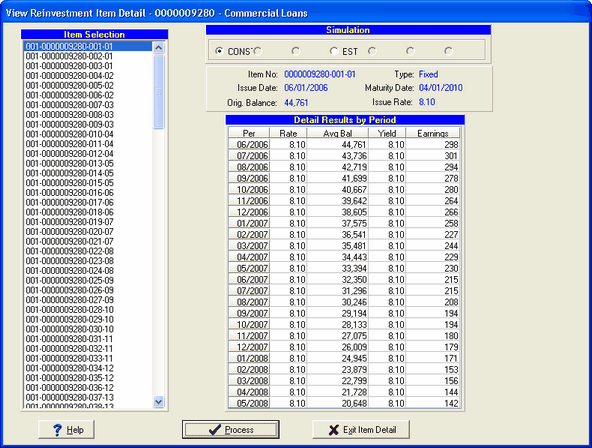
Item Selection
The item's identifying number, xxx-xxxxx-xxx-xx (branch # - A/L account # - an unique sequence number is assigned to each period within each branch - type within each of the 24 periods (fixed, floating, adjustable)) is displayed in the left hand box.
Simulation
All information displayed is based upon the currently selected simulation in the radio box. To switch the view, simply select a different simulation. The default is the default budget simulation.Once an item is selected in the Item Selection section, the item's detailed information is listed on the right side of the screen under the simulation box.
Detail Results by Period
The Results by Period section displays the remaining balance and earnings calculation on the individual item. As items runoff the model creates new replacement items for those balances. The new replacement item balances are divided into the three different types - Fixed, Floating, and Adjustable. Some accounts may not have items for each type. The balances within these types are divided into each of the 24 periods.
The rate is based on the reinvestment rate assumptions the user entered for each period in the Budgeting module. The maturity date is based on an average maturity date of the reinvestment items within each type and period. The average balance shows the reaction to the assumptions forecasted by the user in each of the projection periods.