 Main Menu | Budgeting | Process/Review | View Detail | View Host Item Detail
To view the results on a selected application item, such as an individual loan or CD, click the View Host Item Detail button on the View Account Detail screen. Depending upon the selection of the Detail by Type (Fixed, Floating, and Adjustable) section, either all or just the selected type of items are loaded for selection.
The information shown is for the currently selected simulation. To switch to a different simulation, simply make a selection in the Simulation radio box.
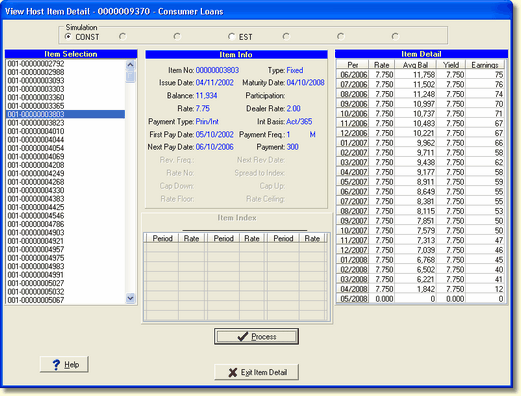
The View Item Detail screen is made up of four sections; Item Selection, Item Info, Item Detail, and Item Index. Each section will be explained below.
Item Selection
In the example above, all items in the account are listed as a result of the Detail By Type not enabled. The item's identifying number, such as a particular loan number, sometimes also called the account number, is displayed in the left hand box.
Item Info
Once an item is selected in the Item Selection section, the item's detailed information is listed in the Item Info section in the middle of the screen. The Item Info section includes various captured details which affect reactions to rate and cash flow values.
Item Detail
The Item Detail section displays the remaining balance and earnings calculation on the item selected in the Item Selection box. If the item is a dealer loan, the Dealer Rate field will be displayed as shown in the example screen above. The correct rate and yield, net the dealer rate, will be displayed in the Item Detail grid
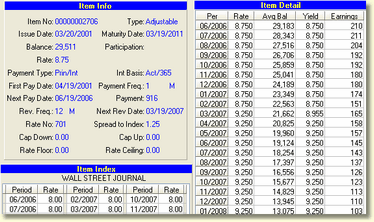
As you can see in the Adjustable loan example below, based upon the rate reset information on this item, the rate is being adjusted in March of 2007 from 8.75% to 9.25% based upon the index it is tied to and the spread upon which it was based originally.
Item Index
Items tied to an index rate with a type Adjustable or Floating will be displayed here. The information shown here is the assumptions made in the model for the associated rate. (These assumptions are made by the user on the Index Rate Assumption tab). Fixed rate items will not display any data in this section.
The Process button is used to calculate the runoff for the item selected and will display the data in the Item Detail grid.