 Main Menu | Reporting | My Reports (Parameter group)
or
 Main Menu | Adv. Income Shock | Assumptions | Growth| Assumption Report
Access to the Target Balance Assumption Report is made by pressing the Assumption Report button at the bottom of the screen.
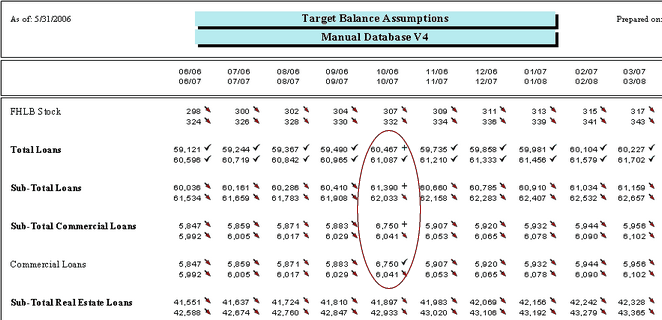
The Target Balance Assumption Report will list the projected target balances and icon indicators showing the type of assumptions on each account and where the assumptions originate for the projected 24 months.
In the Commercial Loans example discussed in the Assumption Process topic above, you can see the target balance results for October 2006 in the Commercial Loans account and its resulting effect to it's higher level accounts in the report below:

We highly recommend that all module (Shock, Budget and EVE) assumption reports be saved each month. This will provide the bank with documentation of the parameters set into the model for any given month. The saved assumption reports can be provided to auditors/examiners if requested.
There are two methods to save the assumption reports.
1. When the assumption report is displayed, select the export icon -  to export the report to your normal month end report location.
2. Go to the Reporting module and place the assumption report in a report group. You can set up a separate report group for all the assumption reports or add the assumption report to an existing monthly report group.