Setting growth assumptions is the process of making projections on the future structure of the balance sheet and projecting accurate Non-Interest Income and Expense. The system will compute the Interest Income and Expense and balance the balance sheet with the Fed Funds Purchased and Sold accounts. State and Federal Taxes are also computed as part of the balancing process and therefore do not require assumptions to be made by the user.
When making assumptions, it is important to produce a realistic picture of risk. The desired structure of the balance sheet will govern the way assumptions should be applied.
Default Assumptions
If no assumptions are made, the default is current General Ledger balance in the account for all projection periods. This does not really constitute an assumption, since this projection is not saved. Next month, when a new General Ledger balance is downloaded, that new balance is projected forward.
The default assumption provides a means to not have to make projections on every account, however it should be noted, under certain circumstances, current General Ledger balance may not represent an appropriate amount to be projected for all projection periods.
Example:
The typical ending balance in Overdraft protection is $ 23,000, but in the month of December, an adjustment of $ 19,000 was posted to this account above the typical activity. If this account is set to project from the default current balance only, the December projection would overstate the balance in the account for all 24 projection months.
It is worthwhile, to scroll through the list of accounts that are defaulted, and examine each projected balance. If an account is found whose current balance is not appropriate to be projected forward for all projection periods, it should be overridden with an appropriate set of balances.
Assumption Distribution
It may be desirable to make assumptions at the individual account level based on anticipated growth. When making assumptions through the distribution method, it is important to note that all accounts within the subtotal structure of the account you are making an assumption for will receive a proportionate amount of the assumption.
As an example, start by making an overall projection of growth for Total Loans of an annual 2.5%.
Now make an assumption at the Total Loan level. Use the utility function Annual Percentage to set the annual growth target. This causes all the accounts subtotaling into Total Loans to receive a proportional share of the projected growth.
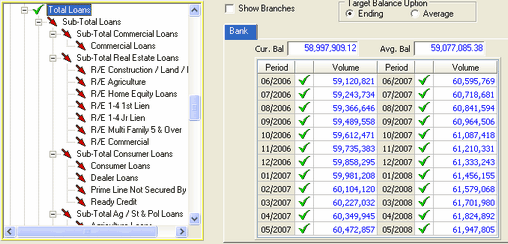
The example Total Loans, grows at an annual rate of 2.5%. A proportional growth is applied to the Commercial Loans account as shown in the May 2007 time frame.
Zero Balance Accounts Assumption Distribution
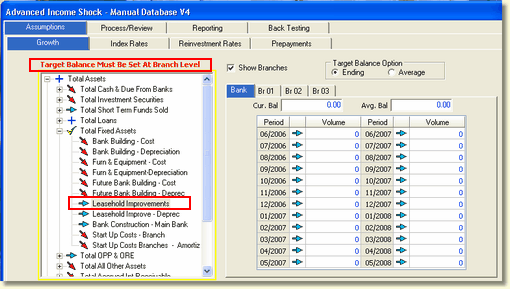
When assumptions are set on a subtotal account at the Bank level, zero balance accounts within the subtotal do not receive a proportional share of the projected growth assumptions. Those accounts will display a message in red above the tree view as shown below. If assumptions are to be applied to the zero balance accounts, they must be applied at the branch level.
Summation
Revising assumptions at levels that have previously been set through a distribution from a higher level account will cause the higher level account to change its projections for the time periods that were revised in a lower level account. Anytime an assumption is made, the system performs a summation up through the account structure to maintain true projected balances at all levels. The totaling accounts whose projected balances have been created due to a summation process are marked with the  icon.
icon.
To demonstrate this in an example, the projections for the Commercial Loans account will be revised.
In October 2006, a large commercial loan is expected to be booked above the expected growth. Revise the projected balance in October 2006 with the Constant Amount every Period option.
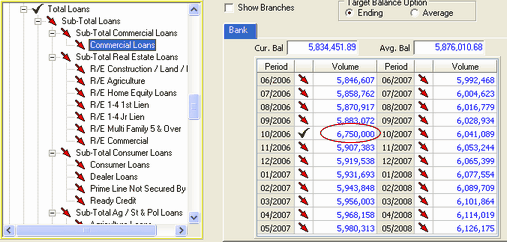
A green check mark has been placed in the October 2006 time frame indicating an overriding assumption was made in only one time period. However, a red down arrow is still displayed next to the Commercial Loans account in the tree view. This is because overriding assumptions were not set in all time periods in the Commercial Loans account, until they are set, the red arrow will remain on the account.
When Total Loans is selected as shown below, the has been placed in the October 2006 time frame which indicates a summation process has taken place to maintain the projected balances.
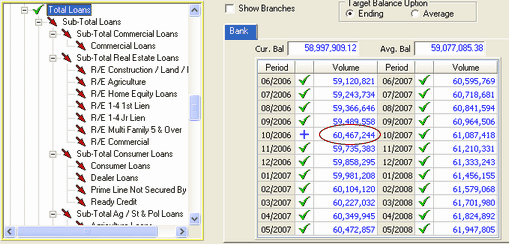
The red down arrow accounts will retain the distribution assumption previously made to the Total Loans account.
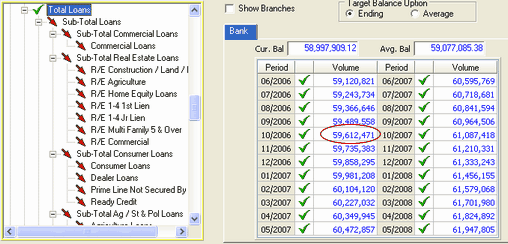
The additional growth placed in the 10/31/2006 time period in the Commercial Loans account has been added to the Total Loans account as shown above. This will result in a slightly larger growth in the 10/31/2006 time period than the originally projected 2.5% annual increase.
After revising the Commercial Loans assumption:
Before revising the Commercial Loans assumption: