 Main Menu | Reporting | My Reports
Selecting the path above will take you to the screen below.
The majority of reports in the Advanced modules of IRR-Solutions® II are parameter driven reports based upon pre-defined master reports. The master report define the type of report and layout, the user defined parameter(s) define the data selection.
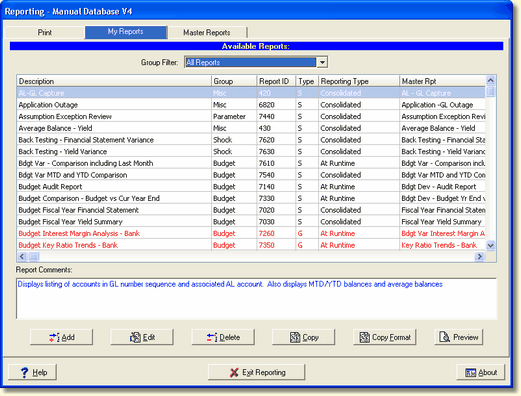
Due to the large number of reports available in IRR-Solutions® II, the My Reports tab displays available reports by pre-defined report groups. The Group Filter allows selection between available groups.
The My Reports screen shows the currently defined reports for the selected group. You may choose to add reports from the Master Reports list or customize selected reports or add multiple versions of the same type of report with different layouts.
The reports within a group will be listed in one of two colored fonts:
Black Fonts - Standard reports, with Type "S", will be listed in alphabetical order.
Red Fonts - If a Report Generator report, with Type "G", is a custom report, the report will be listed in a red font, alphabetized with the Standard reports.