 Main Menu | Budgeting | Index Rates
The Budgeting Index Rates do not share assumptions with the Index Rates in the Advance Income Shock and Advanced EVE modules but the functionality is the same. In Advanced Shock & Advanced EVE the index rates are supplied assumptions based on immediate changes in market rates. The primary difference is the Budget Index Rate assumptions are set by periods within each budget simulation instead of by shock scenarios. In Budgeting, you are assigning assumptions based on how you feel the index will fluctuate in rate over the next 24 months.
Changes to assumptions in Index Rates in Budgeting have no effect on rates in Advanced Income or Advanced EVE. However, if you add a manual rate here, it will also appear in Advanced Income and Advanced EVE. The Effective Rate established for the Manual Rate will appear in all modules. The new rate will require shock valuations in Advanced Income or Advanced EVE to work in those modules.
When preparing a new budget simulation, you have the ability to copy assumptions from the Advanced Income Shock to establish baseline assumptions. See the Utility Copy Function topic in the Budgeting/Assumptions chapter of the manual.

Selecting the Index Rates tab opens the following page where.
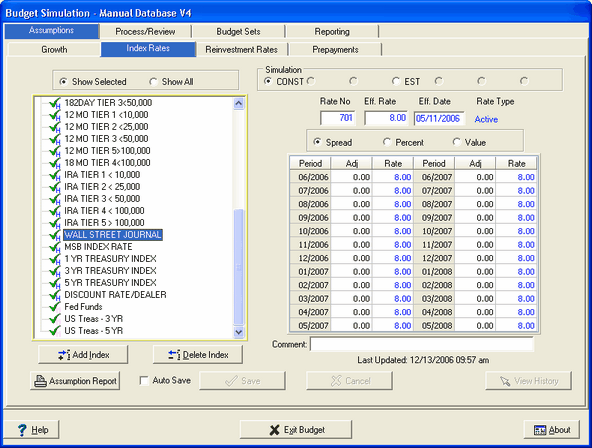
Under this tab, two main areas can be found.
Index Display Area
The left hand portion of the screen allows the user to see and select from the available indices.
This area of the screen shows index rates selected from the institution's database for items (loans and deposits) that would experience a change in yield as a result of an interest rate change. You do not have to worry about which items are tied to the index; that will be handled within the data processing system and data capture. During the data capture processing, the system identifies the indices used by items in the subsystem and displays them here.
Assumption Work Area
The right hand portion of the screen is used to make assumptions to the index rates in periods within each budget simulation. Your main concern here will be to create realistic assumptions to simulate various rate changes during the projection periods. The model could also be used to see different simulations not necessarily tied to market rates such as pricing new products.
There are functions for adding indices, deleting indices, and saving assumptions. You can also view and print a report that summarizes your current index assumptions.