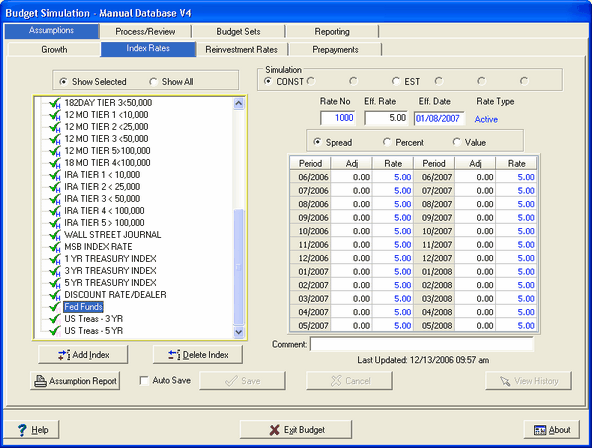
The list of indices in the display area comes primarily from your host system. However, you can add "artificial" or "manual" indices not present on the host system. These indices can be used when it is logical to make assumptions based upon such an index. A typical example of a manual index is the Fed Funds rate.
Below is an explanation of the icons displayed in front of the index descriptions:
 - Indicates an index that has changed on the host since last month download.
 - Indicates the index has not been updated in 3 months. It shows you which indices might need to be "refreshed."
 - Indicates the index has been updated and the assumptions saved, the "Last Updated" field changes to the date and time of this current update and the question mark changes to a check mark.
or - Signifies the index originated within the host file (H).
 or
or  - Signifies the index is created manually (M).
In the example below, Fed Funds and Prime Rate are indices which have been set up manually, signified by the "M" subscript following the check marks.

Show Selected - This radio button displays all indices from the host system and manually entered indices for active items only.
Show All - Selecting this radio button displays all indices from the host system and manually entered indices for active and inactive items (closed, charged off, etc.).
Budget Simulation - Assumptions can be set based on the budget simulation radio button selected. Seven different budget simulations can be set up.
The following will provide a description of the fields and their functions:

Rate No. - This read-only field displays the rate code as it appears in the rate data file from the institution's host data processing system. For manually entered rates, it will display the rate code which is assigned automatically by the system. This code ties the index rate to the individual item whose rate will adjust when the index changes. In this example, Wall Street Journal is rate code 701.
In host systems with a Region field in the host rate file, IRR-Solutions® II will display the rate number as:
10,000 X Region number + Rate number
Example: 10,000 X 2 + 701 = Rate number of 20701
If Region number ="0", result = Rate number
Eff. Rate - This field shows, when appearing in blue, the value of the rate as it appears in the rate data file from your host data processing system. In this example, rate code 1000, Fed Funds equals 5.00% currently. For rates originating from your host system, this field is read-only in order to keep it consistent with the information from your host. For indices that you have set up manually, you will be able to edit this field in order to adjust the effective rate, this will appear in black. Any changes to the Eff. Rate in budgeting will also change in Advanced Income Shock and Advanced EVE.
Eff. Date - This read-only field displays the date that the rate shown was last changed on the host. In other words, the rate shown should be effective from this date to the current date. In this example, following a cut in the fed funds rate on November 21st, Fed Funds was changed to 5.00% in the rate file on November 22nd, and has not changed in the current file since then.
Rate Type - This field will show Active or Optional. Active means the selected index rate is coming from your host system and has adjustable or floating rate items tied to it. Optional indicates that the index is either from the host or an artificial index that can be setup with rate assumption so that the index is available as a base rate during the assumption process.
Comment - The comment area is tied to the index rate selected in the tree view. This field can be used to note the reasoning behind the assumptions that were set for the selected index rate. A date will be displayed to the right of the comment field informing you of the date the comment was last updated.
Rate Assumption Methods - The system uses three methods to set the index assumptions; Spread, Percent, and Value. See Budget Reinvestment Assumptions in the Budgeting/Reinvestment Rates chapter for detailed explanation of these methods.
Manual Rates - Many clients have manual indices set up in IRR-Solutions® II. Effective rates as well as adjustments should be reviewed and updated. Like the indices originating from the host system, the assumptions for manual indices will be "remembered" and the rate assumption in each of the time periods will be recalculated based on changes that are made to the effective rate.