The system provides the ability to classify your institution as the primary bank, multi branch reporting, and parent bank. To access the Edit Institution Startup Properties screen, select the institution to change and right click. This will display a shortcut menu on the screen which includes the Edit Institution button.
Press the Edit Institution button and the following screen will be displayed:
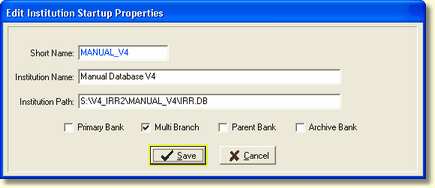
Short Name - The short name for the institution selected is displayed in blue. This field can not be changed.
Institution Name - You can change the name of the institution selected. This will appear on report headings for consolidated reports.
Institution Path - If you have changed the location of the database, the path can be changed here.
Primary Bank - If you want to prevent your primary bank from being copied over, check the box. This will prevent anyone from copying an institution to the primary bank.
Multi Branch - To allow modeling at branch level. Allows reports and assumptions at the branch level
Parent Bank - If multiple institutions are being consolidated for reporting purposes, this option will identify the parent bank if checked.
Archive Bank - The Archive Bank feature is used to suppress the display of an institution on the institution selection screen. The bank can be displayed by checking the Show Archive Banks box on the Bank Selection screen