Main Menu | Reporting | My Reports (Select Report) | Edit
The audit report, in the pop-up menu, provides you with a detailed listing of each Cell for the report selected. Right click on the report grid to access the report design pop-up menu.
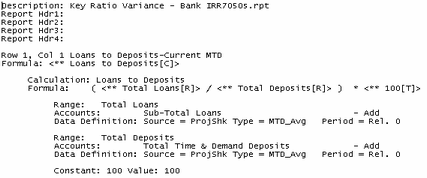
The Audit report contains the following information:
| 1. | It shows what is in each Cell of the selected report. |
| 2. | It also will tell you if there are any column overrides (Data Source and Data Type). |
| 3. | You will see the account ranges assigned to each cell. |
| 4. | The scenario, period, and annualization method will be in each section. |
| 5. | If a cell contains a calculation, that is also displayed. |
A sample of the report is displayed below: