Under certain circumstances it may be desired to duplicate all assumptions and parameters of an institution in another institution to evaluate alternate strategies. By copying an institution to another, all the parameters and assumptions of the original institution are in place.
The Institution Selection screen contains the Copy Institution option. The Target institution has to exist as a selection on the listing of institutions. The Target must be added before it can have an institution copied to it.

If you want to prevent your primary institution from being copied over, see Edit Institution for further instructions.
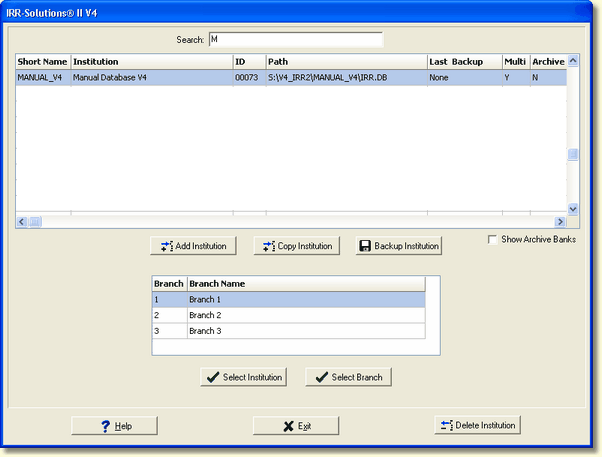
To copy an institution, select the Copy Institution button from the Select Institution screen. The Copy Institution screen is displayed below:
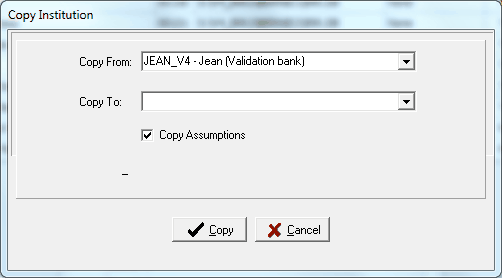
Copy From - Select the institution you want to copy from the drop down menu by clicking on the button to the right.
Copy To - Select the target institution from the drop down menu button by clicking on the button to the right. If user selects "New Institution", the Create New Institution screen is displayed. This allows the user to create a new institution as the target institution. The following screen appears if a Copy To New Institution is selected.\
Copy Assumptions-- To get an exact replicate of the institution, complete with all assumptions, leave the Copy Assumptions check box selected. If a copy is desired and the user wants the target bank's assumptions to remain in place (such as in the case where modeling is being performed with other assumptions and the updated data is desired) deselect the check box so that the assumptions are not copied along with the data.
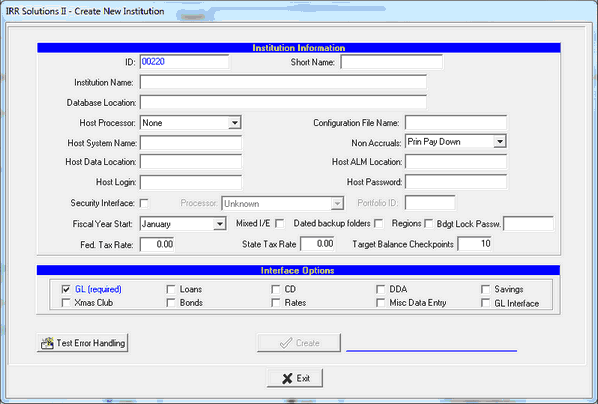
See Add Institution for instructions on filling out this screen if copying to a New Institution. Upon successful completion of adding a new bank, the Copy From bank is copied to the newly created bank.
Select the Copy button to start the copy process. This procedure performs a complete database copy including branches and custom report templates from the source bank to the target bank. If you change your mind, select the Cancel button. Once a copy has been started, it cannot be canceled.
The system will not allow you to copy to an institution that has been flagged as a Primary bank. The drop down list on the Copy To field will not display the Primary bank.