Calculations are the highest level of report components.
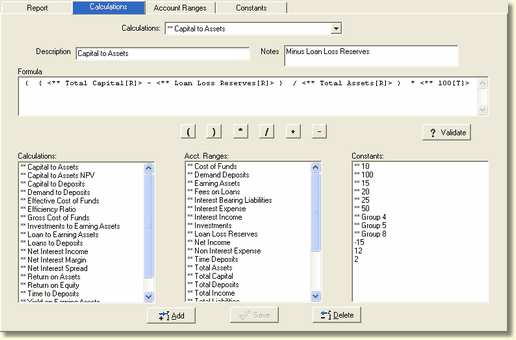
Calculations can utilize other calculations, ranges, and constants in any combination. Calculations support an unlimited level of nesting of all three types of components.
Calculations
The drop-down list shows a currently defined calculations. When a calculation is selected, it's associated structure is displayed in the calculation tree view. You will notice that some calculations start with **. Do not start the description with **, this is reserved for the ranges FinSer sets up for the report generator reports.
Description
This is the free-form user defined description of the calculation. Calculations are displayed in alphabetical order. Since Calculations are shared between reports, a large number of calculations can accumulate quickly. We recommend that you establish a naming convention that groups similar types of calculations together. Do not start the description with **, this is reserved for the ranges FinSer sets up for the report generator reports.
Notes
This is a free-form user defined area.
Calculation Formula
This shows the current structure of the calculation. Since different components can be used in a calculation, the following icons where established to identify the components.
 - a calculation
 - a fully defined account range
 - an account range place holder that has the actual account range not yet defined
 - a constant
Components
The list boxes at the bottom of the screen shows the available calculations, ranges or constants. Select a component and drag / drop it to the Formula box.
Math Operator
The operator for a particular portion of the calculation can be changed by clicking on the appropriate math operator.
