 Main Menu | Reporting | My Reports
Before you can use any of the report generator reports, your account ranges must be defined. Select the report generator report and press the Edit button, navigate to the Account Ranges tab and the following screen will be displayed:
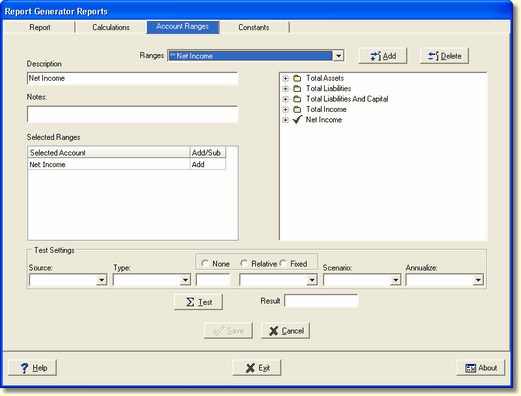
Select the account range from the Ranges drop down box. The only area that needs to be updated will be the Selected Ranges box.
Selected Ranges - Identify the beginning of the account range to be used in the chart of accounts on the right. Select the account, then right click. From the shortcut menu, select Select for Include.
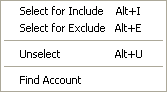
You may select several contiguous accounts by clicking on the first account in the range, holding down the Shift key, then selecting the last account in the range. This will select all accounts in between.
Another recommendation is to select subtotal accounts for the account ranges. This will ensure that new accounts setup in the future under a subtotal will be included in the designed account range, thus eliminating the need to redesign reports when new accounts are added.
To delete an account range, select the account in the tree view on the right to be deleted. This account or subtotal will have a green check mark next to the description. Right click, the shortcut menu above will be displayed. Click on Unselect and the account or subtotal will be removed from the Selected Ranges box on the left.
Continue to the Testing the Account Range and Report topic.