 Main Menu | Reporting | My Reports | Select Report (Advanced Inc. Shock group) and Edit
The Shock Income Summary by Time Period provides a Financial Statement comparison view across all scenarios for a given future point in time. This type of report is commonly used to evaluate an institution's earnings risk across the modeled rate shock scenarios. The Financial statement format will show the impact to bottom line earnings (Net Income) at the end of the report. An enhancement to this report added yields to assist analysis.
IRR-Solutions® II has an advanced feature to model different growth pictures in the different rate shock scenarios. More commonly, a common set of growth assumptions are being used for all rate scenario. This is apparent in the balance sheet view of the Financial Statement when an account shows the same balances across all scenarios. The balancing accounts; Fed Funds Sold / Purchased will be the only accounts showing variations, since they are impacted by the various scenario parameters such as Prepayment speeds.
The future time frame date is in relationship to the current system processing date.
Example: If the system processing date is 10/31/2002, the 12 Month Income Shock will display a Report Time Frame: of October 2003 and the associated results.
The reporting time frame is found to the left of the report header information.
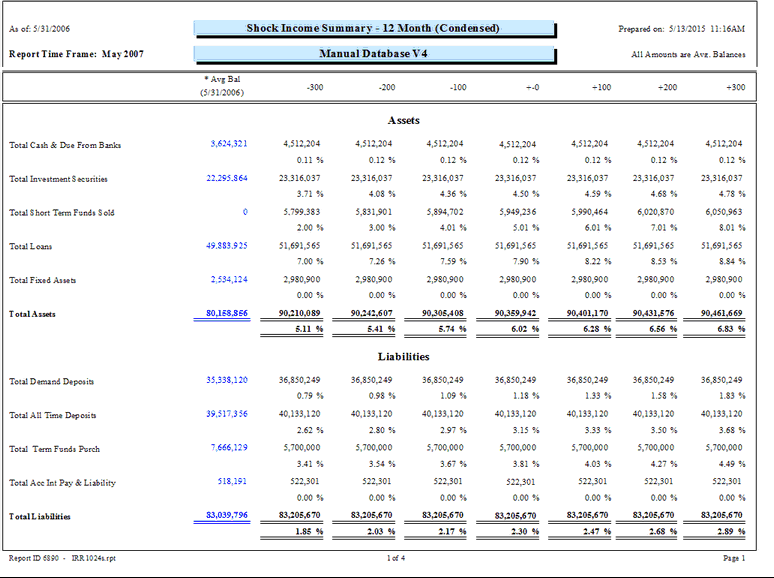
The report will display the accounts in the chart of accounts on the left and associated shock results for each of the seven shock scenarios.
The report will also display the Average Balance or the Current Balance in the first column depending on what Bal Type was selected in the report parameters. If the Bal Type Average was selected, it will display the average balances. If the Bal Type Ending was selected, it will display the current balances.
Remember, if the Bal Type Average is selected, the Income/Expense side will always display ending balances even though the column heading says Avg Bal.
The following screen displays the report parameters that can be customized by the bank.
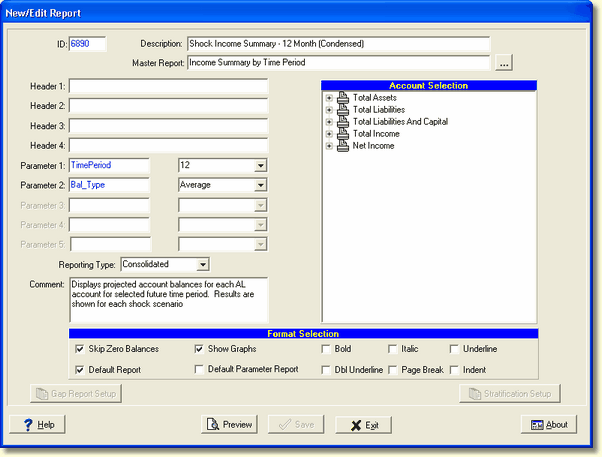
There are two system parameters for this report which can be changed by the user:
Parameter 1: TimePeriod - Time Periods range from 1 month to 24 months. If you change this parameter, you may need to change the header to show the appropriate time period you're using.
Parameter 2: Bal_Type - Select Average(Avg.) or Ending(End.). This parameter pertains to the balance sheet side of the General Ledger. The Income side will always use ending balances. The report will print which balance type you have selected in the upper right hand area, above the scenario columns.
Calculations
Balance Sheet Accounts:
| • | Scenario columns contain respective month's Average Monthly Balances for the account (AVG) or Ending Monthly Balances (END) as of the report time frame date. |
| • | Data is displayed in dollars. |
Income Statement Accounts:
| • | Scenario columns contain respective month's Ending Monthly Balances for the account, from the current processing date through the selected report time frame date. The Income Statement displays the summation of the income calculations. |
| • | Data is displayed in dollars. |
Yields
| • | Yields are always calculated on average balances |
As this report is based on the account projections, growth assumptions should be entered for all the projection time frames being reported for accurate income and balance results to appear.
Adding additional Shock Income Summary reports
You have the ability to set up additional Shock Income Summary reports based on different time frames by taking the following path.
Main Menu | Reporting | My Reports
Select any Shock Income Summary report and choose the Copy button.
Please see Copy Report in the Reporting/My Reports chapter for instructions on copying a new report. Remember to change the Time Period parameter setting on the newly created report.