PDF (Portable Document Format) is an industry standard for representing printed material in electronic format. To view a PDF format file, the Acrobat Reader program is required. It can be freely obtained without cost by following this link to www.adobe.com/products/acrobat/readstep2.html. We have chosen this format as the archive format for saving reports.
File Naming Convention
The name under which a given report is stored is the description of the report. If you store your data on the network, the default reports folder will also be located on the network. Please ensure that your network software supports long file name conventions.

Output directory
An output directory will be created automatically under the database directory labeled PDF. This is the base location of all stored reports. When reports are PDF, directories will be created below this directory, a directory for each processing date. All reports for a given capture date will be stored in this directory. The naming convention for creating the directory will be YYYY_MM.
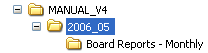
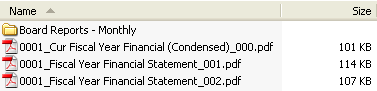
Below the processing date directory, a report group directory will be created when a report group is PDF.


The preceding numbers (0001_, 0003_, 0006_) in the file name will be the starting page number for the report. When a report group is PDF and Continuous Paging is selected, the preceding numbers will be the continuous starting page numbers for each report in the group. The numbers at the end of the file name will identify whether it is a consolidated report (_000) or a branch report (_001 - branch 1, _002 - branch 2, etc.)