 Main Menu | Advanced EVE | Process/Review
As noted in the Data Capture section of the manual, the Advanced modules perform their own separate processing. It would not make sense to automatically process these modules without having reviewed and revised the assumptions.
The Process/Review screen allows you to display the results of your assumptions. When you access the Process/Review tab, the following screen is displayed:
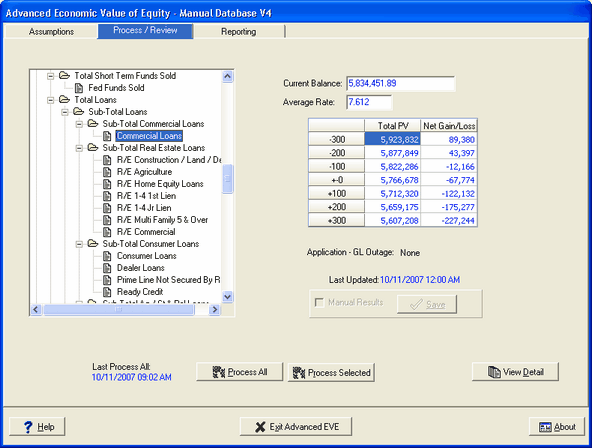
Once you have set your index rates and entered your various prepayment and discount rate assumptions for the significant accounts, types, and items, it is time to "process" the various accounts in order to create the results. This tab will allow you to process the entire balance sheet or to process a select portion of the balance sheet. You will also be able to view your results at the total, subtotal, account, all the way down to the item level from this tab.
What do we mean by "results?" As noted earlier, The purpose of the Advanced Economic Value of Equity (Advanced EVE) module is to measure the value of a financial institution's equity if the assets and liabilities of that institution were subjected to an immediate interest rate shock.
When you process the various accounts, together or individually, you are basically subjecting the accounts to an "immediate interest rate shock," under each of the interest rate scenarios. The results of that interest rate shock are expressed as changes from book value (current balance) of the various accounts in each of the interest rate scenarios. When those changes from book value are summed up on the asset side and netted against a similar summation from the liability side, the result will be the value of the institution's equity in that respective interest rate scenario.
The ability to review the results at any level in the general ledger allows you to isolate the effect of the shock all the way down to the item level. Not only does this allow you to see the sources of the measured interest rate risk on the institution's equity, it also permits you to examine the impact of your Prepayment and Discount Rate assumptions on specific accounts and items, which helps in judging the validity of specific assumptions. If you find accounts or items with assumptions that need to be adjusted, it is then easy to go make those changes and then come back and process just the accounts that were affected by the changes.
Section Functionality
Processing
The Process / Review tab provides the means to process the complete chart of accounts or just selected sections. Processing just selected sections of the chart of accounts can be used when assumptions for only a specific section were changed. This saves time in processing the complete chart of accounts. Results are always summed up through the complete chart of accounts to encompass any changes.
Detail Review
For sections of the chart of accounts that have application detail items associated with them, such as Loans, CD, Investments, etc., an extensive detail review section is available.