The Advanced EVE module in IRR-Solutions® II allows users to enter Manual Results for balance sheet item valuations (either Net Present Value or Net Gain/Loss) in cases where it may be appropriate to override the system calculations.
While figures might look reasonable on the surface, it is always a good idea to look at critical subtotals in order to make sure there are no faulty assumptions.
In the screen below the results look suspect. All things being equal, the gains under "Net" are much larger than one would expect and, depending upon the nature of the bank's investments, one would generally expect higher valuations on the portfolio as rates decline and lower ones as rates rise. This would suggest the need to investigate further.
In many cases, the valuations of the bank's securities portfolio will be generated by the bank's portfolio provider as part of the portfolio accounting service. In those cases, the valuations can be entered manually.
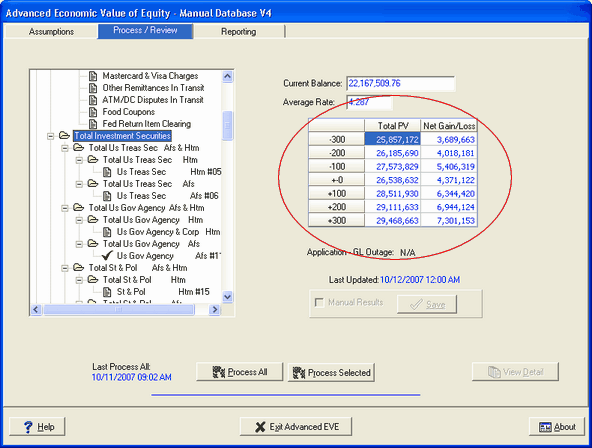
The option for utilizing manual results is found on the Process/Review tab in Advanced EVE. By selecting an individual account, you can enable the Manual Results check box, which will allow changes to the data displayed by the system in the seven shock scenarios. The Manual Results check box is only highlighted when an account has been selected. It will not be highlighted when a subtotal account has been selected.

You can enter the value of the item under the "Total" column or the gain/loss under the "Net" column. Entry in one column only is needed (the system will recalculate the other column based on your entry.)
Manual results will be displayed in red and a green check mark will be placed by the account to indicate manual entries. Clients using FinSer's portfolio products and services will automatically see the valuations for items provided by FinSer's products in red.
If you elect to enter manual results into the model, please be aware of the following:
| • | Manual results must be entered at the branch level if you are running a model with branch setup. This means you must select the branch, rather than the institution, when entering the model. Otherwise, the check box to enable Manual Results is not active. |
| • | Manual results must be entered at the account level. They will not be accepted at the subtotal level. |
| • | All Manual entries are cleared with each monthly processing. All security imports will reset the manual overrides. Any manual entries entered by the user will need to be set up again. |
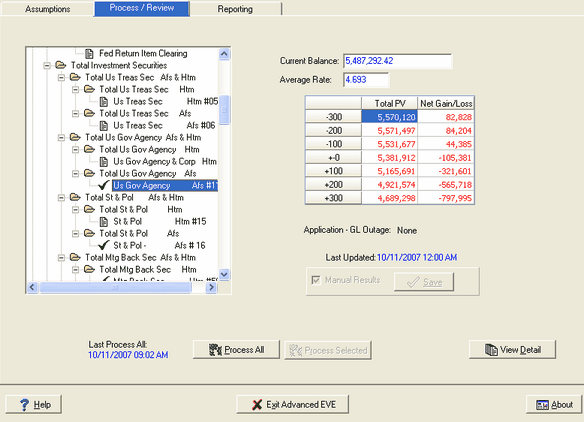
In the screen above, when you check the Manual Results box, the figures in the fields under "Total PV" and "Net Gain/Loss" turn red and you are allowed to change these fields at each of the shock levels. In the example above, you can enter either the value of the securities at each shock level under "Total PV," or the gain or loss for the securities at each shock level under "Net Gain/Loss." Whichever way the results are entered, the system will recalculate the other value.
After you have made your changes, click save. The Last Updated field changes to reflect this most recent update and a green check mark appears next to the account in the tree structure to indicate that this account has results that have been manually entered.
Returning to the subtotal "Total Investment Securities", you can see the overall effect of the manual entries that you made to the individual account.
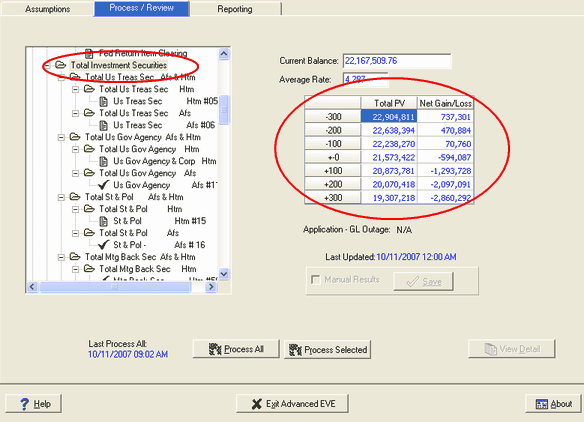
Not only are the values under "Net Gain/Loss" much more reasonable, they are the exact overall values generated by our investment portfolio provider.