Every GL account must be interfaced or associated with an AL account in your chart of accounts. On occasion, you may add new GL accounts. When this happens, you will need to indicate the AL account to which it is tied. If the AL account does not exist, you will need to add the account in its proper place in your chart of accounts.
PROCESS:
During the copy process of the GL in Data Capture, you may receive an error message:
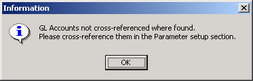
This indicates that you have new GL accounts that are not tied to an AL account in IRR-Solutions® II.
To Correct:
| ❑ | Exit Data Capture |
| ❑ | Click on Param. Setup |
| ❑ | Click on the Common -- GL/AL Cross Ref tab |
| ❑ | On the right side, the listing will show GL accounts not interfaced. |
If there is an existing associated AL account on the left,
| ❑ | use Branch Auto Interface to interface where an existing association has already been established (ie. you have added a new branch of an existing account.) This will interface the new account with the first "like" account it finds. |
If there is no associated AL account on the left, you will need to create the AL account in the Chart of Accounts:
| ❑ | Click on the GL/AL Cross Ref tab |
| ❑ | Locate the folder where the account should be located within. |
| ❑ | Drag the GL account to the subtotal |
| ❑ | The description of the new account created will equal the GL account description |
| ❑ | If you need to change the order of the account, click on the Chart of Accounts tab and use the MOVE buttons. |
After all GL accounts are associated with AL accounts (no accounts on the right)
| ❑ | Click the Exit Parm. Setup button |
| ❑ | Click Data Capture |
| ❑ | Start the processing again. Processing should complete GL data capture and continue through all selected accounts. |
| ❑ | Recapture GL History by clicking on the GL History button. |