IRR-Solutions® II clients that are also clients of FinSer's Investment Accounting Service Bureau will utilize the Security Import tab to request and import the investment information.
The system will communicate with the FinSer Bulletin Board System via FTP or modem dialup to download the investment information.
This screen will be configured during installation of the system and should not need to be changed. Any problem during the Security Export / Data import should be reported to FinSer Support.
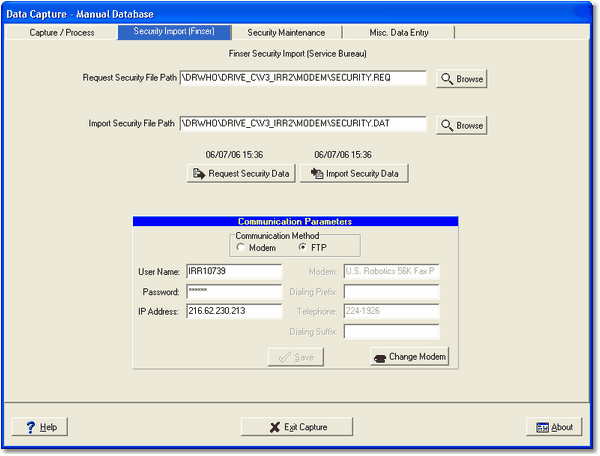
Request Security File Path
During the communication process, the system will place certain data files in a work area on your system. The export file path is the location where your security request file will be placed.
Import Security Data File Path
The import file path is the location where the files will be place from the FinSer BBS.
Request Security Data/Import Security Data
These buttons are used to send and receive your security information from FinSer. Above each button, the date and time you requested information will be displayed.
Communication Parameters
The bottom section of the screen contains parameters used to dial into FinSer's bulletin board system.
Communication Method - The modem method is used to dial into FinSer's server to export/import your security information. The FTP (File Transfer Protocol) method is used if you choose to use the internet to export/import the security information. FTP is the default and recommended method.
User Name - This is the security user name login assigned to you to access FinSer's bulletin board system. Do not change this information without consulting FinSer Support.
Password - This is the password which is part of your login to access FinSer's bulletin board system when exporting/importing security information. Do not change this information without consulting FinSer Support.
IP Address - Enter the IP address provided by FinSer if the Communication Method selected is FTP.
Modem - This is the name of your modem as configured in the Control Panel of your system. Should you need to change the modem in your system, use the Change Modem to obtain the new modem name. Do not attempt to type in the name directly as it has to be exactly the way it appears in the Control Panel.
Dialing Prefix -If your telephone system requires you to enter a number to get an outside line, enter the number here.
Telephone - This is FinSer's bulletin board telephone number.
Dialing Suffix -If you telephone system requires you to enter a code after you have dialed your long distance number, enter the number here.
Save - If you have made any changes to the screen, the Save button will be highlighted. Make sure you save any changed information before moving to another screen.