Under certain circumstances, making assumptions at only the account level may still be too broad an approach. The system provides the ability to split assumptions by the item type level contained in the account. The three types are Fixed, Floating and Adjustable rate items. Below are definitions of the three types:
Fixed - Any item whose rate does not change over the life of the instrument.
Floating - Any item whose rate adjustment period is equal to or less than 1 month.
Adjustable - Any item whose rate adjustment period is greater than 1 month.
The inheritance concept is applied here as well. When an account is split into assumptions by type, each type starts out inheriting the assumption from the account level. It is up to the user to select which type(s) to give separate assumptions.
To split the assumptions by type, select the By Type check box:
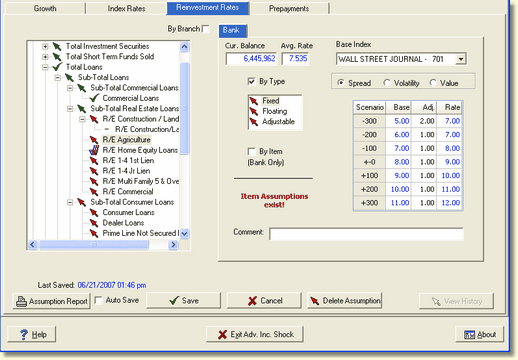
Checking the By Type box allows us to access the fixed, floating, and adjustable instruments in that account. The up arrows  next to the types indicate that those types are currently receiving their assumptions from the account level.
In this example, we are making an assumption to the Fixed type items in this account.
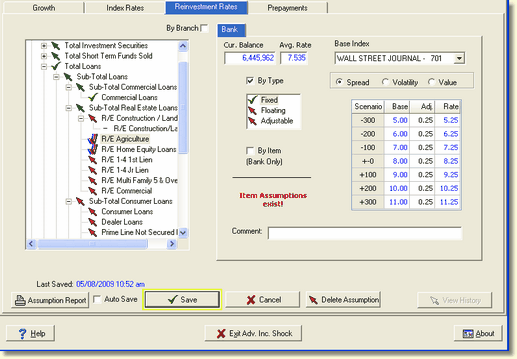
Note that the up arrow has changed to a green check mark  , signifying that the rate assumption for fixed rate R/E Agriculture loans now originates here rather that from an account above. Note also that there is now a triple, three colored check mark
  next to the account R/E Agriculture in the General Ledger tree structure. This indicates that one or more assumptions for this account have been set at the type level.
If you decide that it is not appropriate to set the reinvestment rate assumption by type, just uncheck the box next to By Type. A warning message will be displayed asking you to confirm deletion.
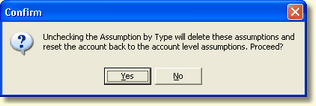
Clicking Yes will delete the assumptions at the type level and set them back to the assumptions at the account level.
If after having deleted the assumptions by type, you changed your mind and decided that you wanted to keep the assumptions that you had input by type, you would have to go through the process again and re-input them. Clicking Enable would not restore them, as they were deleted when you disabled the type assumptions.