 Main Menu | Param. Setup | Host Interface | Application Cross Reference
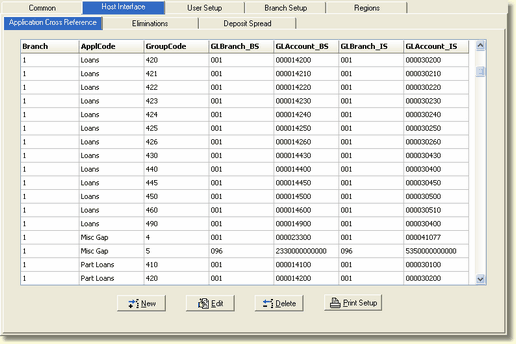
The IRR-Solutions® II software gathers information from the application files (DDA, CDs, Loans, and Investments). In order for the system to know which application account's (DDA, CDs, Loans, and Investments) - asset and liability balance sheet accounts tie with what - income and expense income statement accounts, you must cross reference your application group codes to your G/L accounts using this option.
This cross reference is initially set up during installation of the software. IRR-Solutions® II will automatically update the Application Cross Reference with new group codes set up in the host system when you download each month. However, if you set up new G/L only items in your host system, remember those new G/L only items will also have to be set up in the IRR-Solutions® II system through this option.
When entering or importing a Misc. Gap item and if the G/L accounts assigned to the Misc. Gap item are new, the system will automatically set up the new G/L in the Application Cross Reference tab. If the Misc. Gap item is assigned to an existing Application Cross Reference record with an ApplCode of General Ledger, the system will convert the existing "G" record to the "M" record in the Application Cross Reference.
The Application Cross Reference screen is displayed below.
Add a New Group Code
All Host group codes must be assigned to the appropriate balance sheet and income statement G/L accounts. With the initial IRR-Solutions® II install, the interface between the Host application files and G/L is created. If in the future, the Bank sets up new application group codes, they must set up the Application Cross Reference.
To add a new group code to the A/L system, press the New button and the following screen will be displayed:
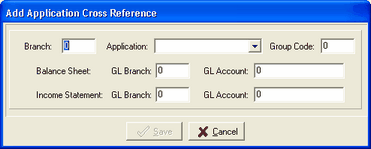
Branch - Enter the A/L branch.
Application - Press the drop down box and select the application you are setting up. Available applications are: Loans, Time Deposits, Demand Deposits, Bonds, Participation Loans, General Ledger, Security Import, and Misc Gap(Auto generated).
Group Code - For the G/L only items, you will be making up a group code number. Enter the new group code sequentially.
Balance Sheet - GL Branch/Account - Enter the asset/liability GL account number for the group code.
Income Statement - GL Branch/Account - Enter the income/expense GL account number for the group code.
Edit an Existing Group Code
If the Bank re-classifies application group codes to different G/L accounts on the Host system, they will need to edit the same Application Cross Reference items in IRR-Solutions® II. To edit an existing group code in the A/L system, press the Edit button and the following screen will be displayed:
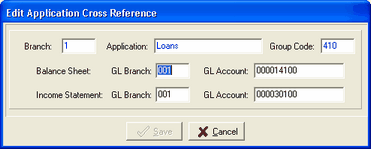
AL Branch - The A/L branch font is blue and cannot be changed.
Application - This field is in blue and cannot be changed.
Group Code - This field is in blue and cannot be changed.
Balance Sheet - GL Branch/Account - Enter the asset/liability GL account number for the group code.
Income Statement- GL Branch/Account - Enter the income/expense GL account number for the group code.
Delete a Group Code
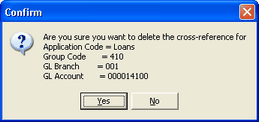
To delete an existing group code in the A/L system, select the group code you wish to delete and press the Delete button. The system will display the following confirmation message dialog box, giving you another chance to change your mind.
Print Setup
Prints the listing of the cross reference file.