 Main Menu | Reporting | My Reports | Select Report (Gap group) and Edit
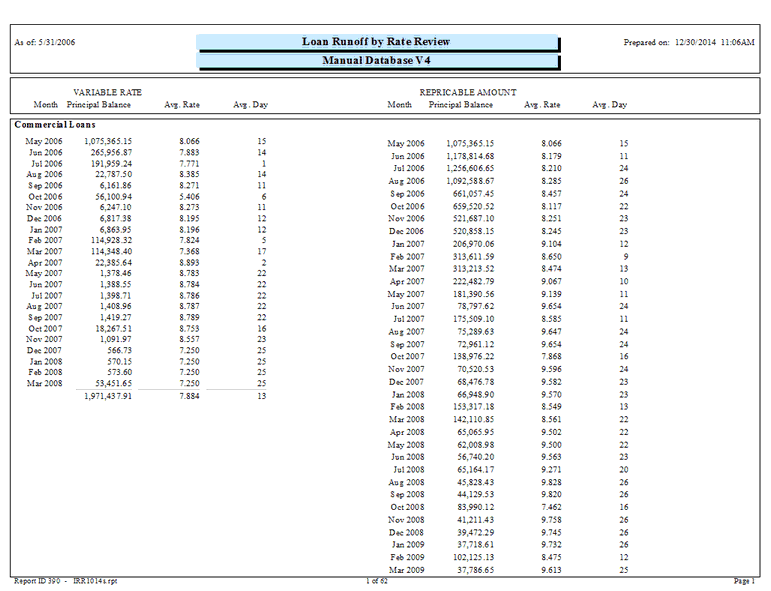
The Rate Review Runoff report lists variable rate items. The report is actually made up of two separate reports: The left column or Variable Rate column and the right column or Repriceable Amount column. A description of each column, using Loans as an example, is listed below:
Variable Rate column - The first month contains past due loans, loans with no rate review date, and loans with a review date of the current processing month. These loans are immediately repriceable.
The left side of the report shows, by month, the principal reduction of the loan. The maturity date is replaced by the prime review date, when the prime review date is reached, the remaining principal balance is shown in that month and the runoff stops for that loan.
Repriceable Amount column - The first month contains past due loans. It also contains loans with no rate review date and loans with a review date of the current processing month. These loans are immediately repriceable.
The right column shows the available money that can be repriced in any given month. It is composed of two elements. If the loan can be repriced in the month (based on the prime review date and advanced by the prime review term) then the remaining principal is shown. If the loan cannot be repriced, then the principal portion of the payment is shown. Each loan is run down to maturity (based on principal payments) and then drops off the report.
Example: A loan has a prime review term every six months. For the first five months, the principal portion of the payment is shown. The sixth month shows the remaining principal balance. The next five months show principal payments, then the following month shows the remaining balance, etc. until the maturity date is reached.
The Runoff by Rate Review report can be configured through their parameter selection to provide different views. The following screen displays the system parameter that can be customized by the bank.
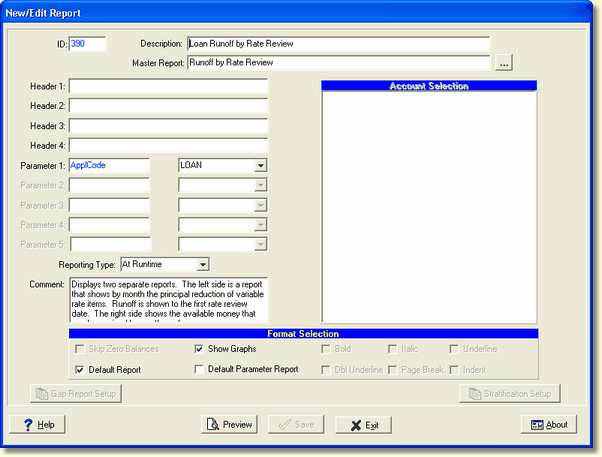
There is one system parameter for this report which can be changed by the user:
Parameter 1: ApplCode - Options are CD, Loan, DDA, Saving, Xmas, and Misc. If you change this parameter, you may need to change the header to show the appropriate application you're using.