Shared Index Rates can be accessed in two of the IRR-Solutions® II modules. For Budgeting Index Rates, go to the Budgeting chapter for further details. Below are the paths to access the shared Index Rates.
 Select Main Menu | Advanced Inc. Shock | Assumptions | Index Rates
Select Main Menu | Advanced EVE | Assumptions | Index Rates

For variable rate (floating daily or periodically adjustable) items, the cash flows can vary. Periodic interest payments can change depending upon changes in an underlying index, which can change as market rates and economic conditions change. Thus, for variable rate items, an assumption should be made concerning the underlying indices.
The Index Rate assumptions will not only be useful for arriving at realistic cash flow projections, but will also be employed later in setting Discount Rate assumptions in the Advanced EVE module.
Selecting the Index Rates tab opens the following page where the index assumptions are made:
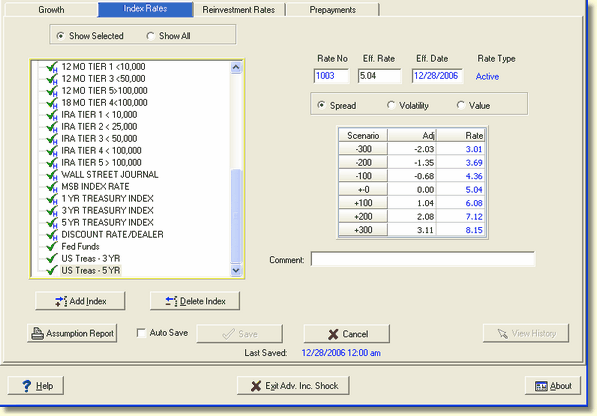
On this tab, two main areas are displayed.
Index Display Area
The left hand portion of the screen allows the user to see and select from the available indices.
The box on the left shows all rates from the Host Master Rate file plus any built by the user in IRR2. During the data capture processing, the system identifies the indices used by items in the subsystem and displays them here by default.
Assumption Work Area
The right hand portion of the screen is used to make assumptions to the index rates in the user defined shock scenarios. The main concern here will be to create realistic assumptions about how each index would respond to immediate changes in market rates. (when you say "immediate change in market rates," you would be referring to an immediate change in the fed funds rate, i.e. an up or down "shock" in the fed funds rate.)
There are functions for adding indices, deleting indices, and saving assumptions. You can also view and print a report that summarizes your current index assumptions.