 Main Menu | Reporting | My Reports (Parameter group)
or
Main Menu | Advanced EVE Module | Assumptions | Index Rates | Assumption Report
You can view and print a paper copy of your index assumptions by clicking the Assumption Report button at the bottom of the Index Rates screen. Doing so will open a window similar to the one below:
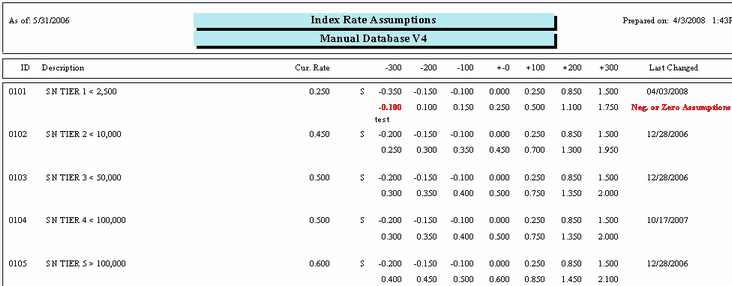
This report provides a summary of the current index assumptions listed in order of rate number. It shows the current rate for each index and the initials to the right of the current rate indicate whether the index is based on the Spread (S), the Percentage (P), or the Value (N) method.
The top line for each index shows the spread, percentage, or value used in each shock scenario and the second line shows the results that were obtained using that spread, percentage, or value. Review the second line carefully for this line will show any index rates that contain negative or zero assumptions. The column to the far right on the report will show the date that the assumption was last changed. If a date is in bold, the assumptions are older than three months and should be reviewed to see if they are still appropriate and re-save them to remove the warning.
We highly recommend that all module (Shock and EVE) assumption reports be saved each month. This will provide the bank with documentation of the parameters set into the model for any given month. The saved assumption reports can be provided to auditors/examiners if requested.
There are two methods to save the assumption reports.
1. When the assumption report is displayed, select the export icon -  to export the report to your normal month end report location.
2. Go to the Reporting module and place the assumption report in a report group. You can set up a separate report group for all the assumption reports or add the assumption report to an existing monthly report group.