 Main Menu | Reporting | My Reports | Select Group Filer (Advanced Inc. Shock) and Edit
The Runoff by Fiscal Year report displays actual remaining balances for interest bearing balance sheet accounts with underlying details. The report shows 12 months of projections, by the configured fiscal year.
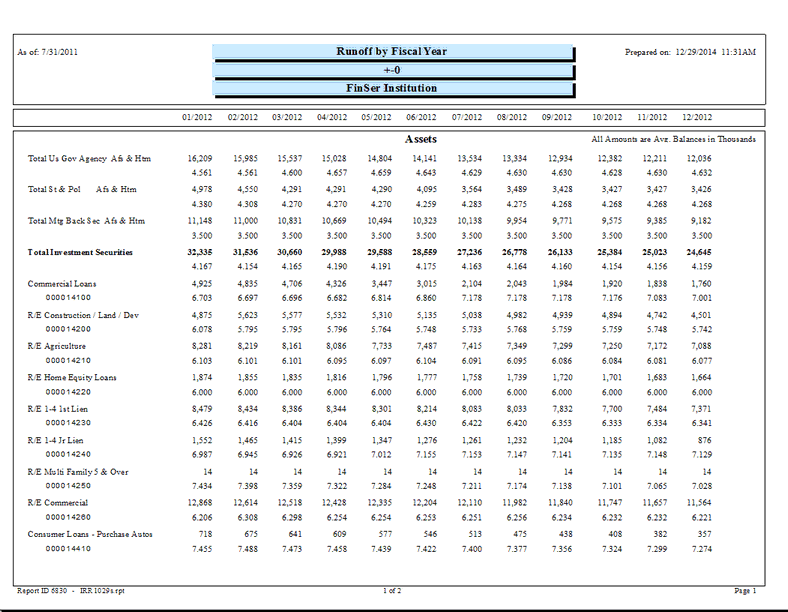
The following screen displays the system parameters that can be customized by the bank.
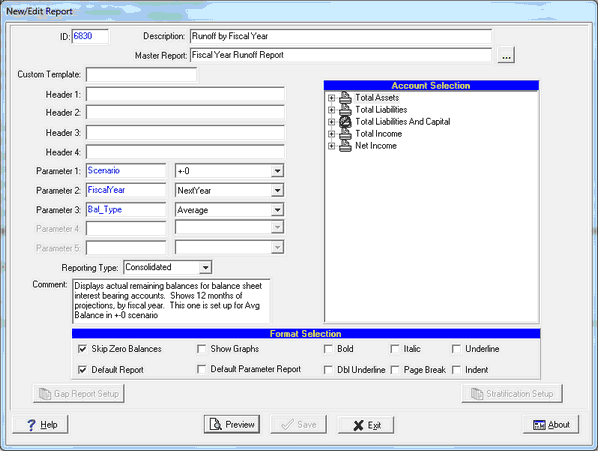
There are three system parameters for these reports which can be changed by the user:
Parameter 1: Scenario - The default scenario is +-0. Seven shock scenarios are available. If you change this parameter, you may need to change the header to show the appropriate scenario you're using.
Parameter 2: FiscalYear - Options are ThisYear or NextYear. If you change this parameter, you may need to change the report description and header to show the appropriate title for the data you're using.
Parameter 3: Bal_Type - Select Average(Avg.) or Ending(End.). This parameter pertains to the balance sheet side of the General Ledger. The Income side will always use ending balances. The report will print which balance type you have selected in the upper right hand area, below the date columns.
Calculations
Balance Sheet Accounts:
| • | Date columns contain respective month's Average Monthly Balances for the account (AVG) or Ending Monthly Balances (END) |
| • | Data is displayed in thousands of dollars. |