Main Menu | Data Capture | Misc. Data Entry
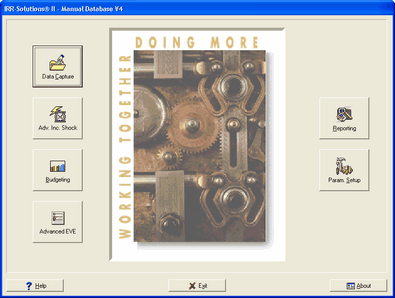
Many banks use FHLB borrowed funds in their institutions. To better reflect the cash flows, these items can be setup in the Misc. Data Entry section of IRR-Solutions® II, similar to other interest bearing items that are only carried in the General Ledger.
You can use the following steps to set up FHLB borrowings in Misc. Data Entry:
For ALL FHLB Borrowings
|
|
||||
|
|
||||
|
|
||||
|
|
||||
|
|
||||
|
|
||||
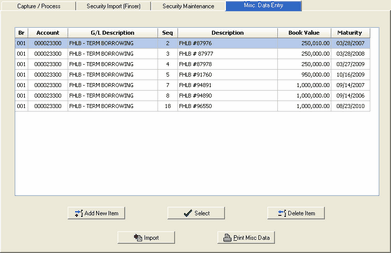
The entry screen will appear. You will be entering information in the following fields. |
|
||||
|
|
||||
|
|
||||
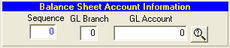
UNDER BALANCE SHEET ACCOUNT INFORMATION GL Branch: Branch number for the item where it is booked in the General Ledger.
GL Account: This is the General Ledger account number for the balance sheet account the item is booked into. By clicking the Browse Icon (Magnifying glass), a listing of your Balance Sheet accounts will appear for selection. This ensures the account number is accurately filled in for the selected account.
Sequence: The system will assign a sequence number to differentiate between multiple items going into the same GL account. |
|
||||
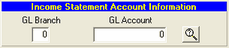
UNDER INCOME STATEMENT ACCOUNT INFORMATION: GL Branch: Branch number where the generated income/expense is booked in the GL.
GL Account: This is the GL income statement account number the interest/expense is booked into. By clicking the Browse Icon (Magnifying glass), a listing of your Income Statement accounts will appear for selection. This ensures the account number is accurately filled in for the selected account. |
|
||||
DETAILS IN ENTRIES WILL DEPEND ON THE NATURE OF THE FHLB BORROWINGS.
Recent revisions in IRR-Solutions® II have modified the entry options required, based on the nature of your FHLB borrowings. You should review your existing entries and revise as necessary. Use the chart below to determine the entry options for your particular type of borrowing.
NATURE OF BORROWING |
DESCRIPTION |
PAYMENT TYPE IN IRR2 |
SECTION BELOW FOR DETAILS |
Bullet |
Principal and interest paid at maturity |
AT MATURITY |
A |
Bullet |
Principal paid at maturity and interest paid at each payment frequency |
INTEREST |
B |
Declining Balance |
Straightlines the principal repayment and interest paid on the balance at each payment frequency |
PRINCIPAL |
C |
Amortizing |
Splits the payment between the principal and the interest |
PRINCIPAL AND INTEREST |
D |
Balloon |
Balloon payments at a given date. IRR-Solutions II will treat balloon date as maturity date. |
Depends on borrowing |
E |
Adjustable |
Adjustable rate at given review times |
PRINCIPAL AND INTEREST |
F |
SECTION A: Bullet: Principal and interest is paid at maturity
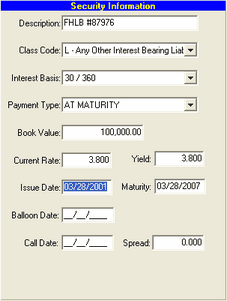
UNDER SECURITY INFORMATION Description: Enter the description of the borrowing
Class Code: Select L—Any Other Interest Bearing Liability
Interest Basis: If known, select the interest basis from the drop-down. Very commonly it will 30/360.
Payment Type: Select AT MATURITY
Book Value: Enter the current amount of the borrowing
Current Rate: Enter the current rate of the borrowing
Yield: If an effective yield is known, enter it in the yield entry; otherwise use the current rate.
Note: The yield is used in the cash flow calculation and must be present
Issue Date: Enter the initial borrow date
Maturity: Enter the maturity date
Call Date: Enter the call date, if applicable
Spread: For callable items: Enter the spread (a percentage amount that represents the margin the issuer has to obtain to call the investment, typically 0.50% – 0.60%).
Note: If there is not a spread in this field or setup in Parameter Setup/Bank Info, the item will not be called |
|
||
UNDER PAYMENT INFORMATION Leave fields blank |
|
||
UNDER ADJUSTABLE RATE INFORMATION Leave fields blank
The item is now listed in Misc. Data Entry. |
|
SECTION B: Bullet: Principal paid at maturity; interest paid at each payment frequency
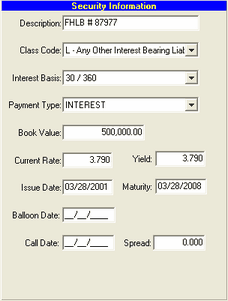
UNDER SECURITY INFORMATION Description: Enter the description of the borrowing
Class Code: Select L—Any Other Interest Bearing Liability
Interest Basis: If known, select the interest basis from the drop-down. Very commonly it will 30/360.
Payment Type: Select INTEREST
Book Value: Enter the current amount of the borrowing
Current Rate: Enter the current rate of the borrowing
Yield: If an effective yield is known, enter it in the yield entry; otherwise use the current rate.
Note: The yield is used in the cash flow calculation and must be present.
Issue Date: Enter the initial borrow date
Maturity: Enter the maturity date
Call Date: Enter the call date, if applicable
Spread: For callable items: Enter the spread (a percentage amount that represents the margin the issuer has to obtain to call the investment, typically 0.50% – 0.60%).
Note: If there is not a spread in this field or setup in Parameter Setup/Bank Info, the item will not be called. |
|
||
UNDER PAYMENT INFORMATION If a payment amount is known, enter it along with the remaining items.
However, if you would like the system to calculation the appropriate payment, leave fields blank. |
|
||
UNDER ADJUSTABLE RATE INFORMATION Leave fields blank
The item is now listed in Misc. Data Entry. |
|
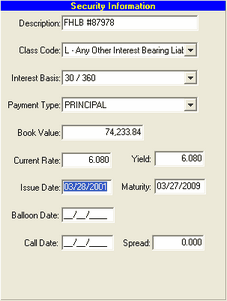
SECTION C—Declining Balance: Straightlines the principal repayment and interest paid on the balance at each payment frequency
UNDER SECURITY INFORMATION Description: Enter the description of the borrowing
Class Code: Select L—Any Other Interest Bearing Liability from the selection list
Interest Basis: If known, select the interest basis from the drop-down. Very commonly it will 30/360.
Payment Type: Select PRINCIPAL
Book Value: Enter the current amount of the borrowing
Current Rate: Enter the current rate of the borrowing
Yield: If an effective yield is known, enter it in the yield entry; otherwise use the current rate.
Note: The yield is used in the cash flow calculation and must be present.
Issue Date: Enter the initial borrow date
Maturity: Enter the date when payments end
Call Date: Enter a call date (if applicable)
Spread: For callable items: Enter the spread (a percentage amount that represents the margin the issuer has to obtain to call the investment, typically 0.50% – 0.60%).
Note: If there is not a spread in this field or setup in Parameter Setup/Bank Info, the item will not be called.
|
|
||
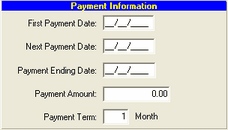
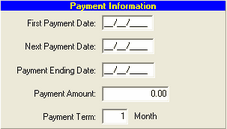
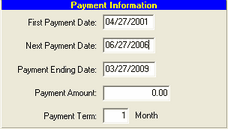
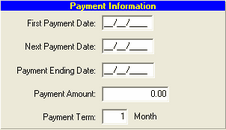
UNDER PAYMENT INFORMATION First Payment Date: Enter the date the first payment is made after issue
Next Payment Date: Enter the next payment date after the current capture date
Payment Ending Date: Enter the Maturity date or the last payment date
Payment Amount: Leave payment amount blank and the program will pay the instrument in a straight line method calculating the necessary payment
Payment Term: Enter the proper combination to indicate the frequency of payment (1 M ==once per month) |
|
||
UNDER ADJUSTABLE RATE INFORMATION Leave fields blank
The item is now listed in Misc. Data Entry. |
|
SECTION D—Amortizing: Splits the payment between the principal and the interest
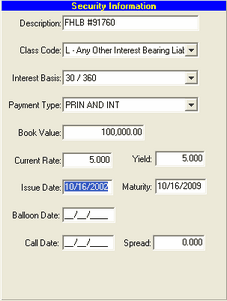
UNDER SECURITY INFORMATION Description: Enter the description of the borrowing
Class Code: Select L—Any Other Interest Bearing Liability from the selection list
Interest Basis: If known, select the interest basis from the drop-down. Very commonly it will 30/360.
Payment Type: Select PRIN AND INT
Book Value: Enter the current amount of the borrowing
Current Rate: Enter the current rate of the borrowing
Yield: If an effective yield is known, enter it in the yield entry; otherwise use the current rate.
Note: The yield is used in the cash flow calculation and must be present.
Issue Date: Enter the initial borrow date
Maturity: Enter the maturity date
Call Date: Enter the call date, if applicable
Spread: For callable items: Enter the spread (a percentage amount that represents the margin the issuer has to obtain to call the investment, typically 0.50% – 0.60%).
Note: If there is not a spread in this field or setup in Parameter Setup/Bank Info, the item will not be called. |
|
||
UNDER PAYMENT INFORMATION If a payment amount is known, enter it along with the remaining items.
However, if you would like the system to calculation the appropriate payment, leave fields blank. |
|
||
UNDER ADJUSTABLE RATE INFORMATION Leave fields blank
The item is now listed in Misc. Data Entry. |
|
SECTION E—Balloon: Balloon payment at a given date
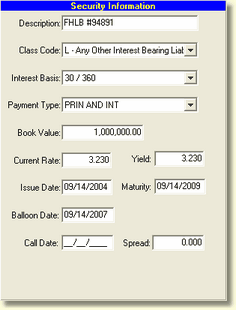
UNDER SECURITY INFORMATION Description: Enter the description of the borrowing
Class Code: Select L—Any Other Interest Bearing Liability from the selection list
Interest Basis: If known, select the interest basis from the drop-down. Very commonly it will 30/360.
Payment Type: Select appropriate payment type based on item
Book Value: Enter the current amount of the borrowing
Current Rate: Enter the current rate of the borrowing
Yield: If an effective yield is known, enter it in the yield entry; otherwise use the current rate.
Note: The yield is used in the cash flow calculation and must be present.
Issue Date: Enter the initial borrow date
Maturity: Enter the maturity date (later redemption date)
Call Date: N/A
Spread: N/A
Balloon Date: Enter the balloon date (earlier redemption date, which is prior to maturity date) |
|
||
|
|
||
|
|
||
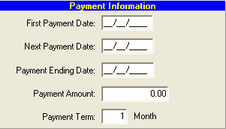
UNDER PAYMENT INFORMATION Leave fields blank
|
|
||
|
|
||
|
|
||
UNDER ADJUSTABLE RATE INFORMATION Leave fields blank
The item is now listed in Misc. Data Entry. |
|
SECTION F—Adjustable: Adjustable rate at given review timeframes
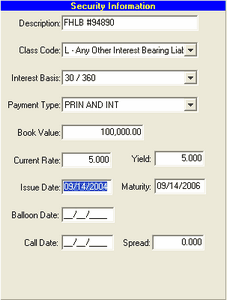
UNDER SECURITY INFORMATION Description: Enter the description of the borrowing
Class Code: Select L—Any Other Interest Bearing Liability from the selection list
Interest Basis: If known, select the interest basis from the drop-down. Very commonly it will 30/360.
Payment Type: Select PRIN AND INT
Book Value: Enter the current amount of the borrowing
Current Rate: Enter the current rate of the borrowing
Yield: If an effective yield is known, enter it in the yield entry; otherwise use the current rate.
Note: The yield is used in the cash flow calculation and must be present.
Issue Date: Enter the initial borrow date
Maturity: Enter the maturity date
Call Date: Enter the call date, if applicable
Spread: For callable items: Enter the spread (a percentage amount that represents the margin the issuer has to obtain to call the investment, typically 0.50% – 0.60%).
Note: If there is not a spread in this field or setup in Parameter Setup/Bank Info, the item will not be called. |
|
||
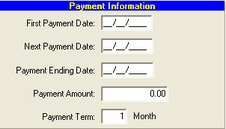
UNDER PAYMENT INFORMATION If a payment amount is known, enter it along with the remaining items.
However, if you would like the system to calculation the appropriate payment, leave fields blank. |
|
||
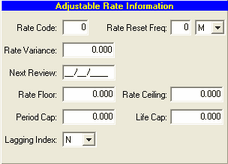
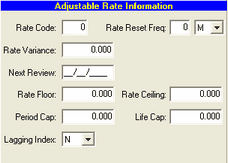
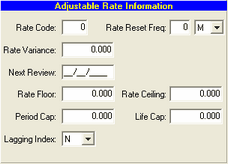
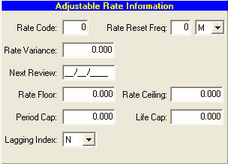
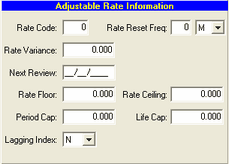
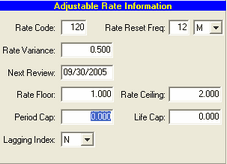
UNDER ADJUSTABLE RATE INFORMATION Fill in required fields:
Rate Code: Enter the host rate code associated with the item (must be an existing rate code)
Rate Reset Freq: Select the items reset frequency
Rate Variance: Enter the variance or spread in percent of the item to the original rate when the item was made
Avg Coupon: Enter the average rate of the future coupons the item is scheduled to reset to
Next Review: Enter the date the rate on the item is due for review
Rate Floor: (if applicable) enter the limit of the rate adjustment in the down direction over the life of the item
Rate Ceiling: (if applicable) enter the limit of the rate adjustment in the up direction over the life of the item
Period Cap: (if applicable) enter the limit for a single period rate adjustment
The item is now listed in Misc. Data Entry. |
|
FOR ALL BORROWINGS: After the details are entered and saved, the following steps are needed for completion of the setup.
HOST INTERFACE-APPLICATION CROSS REFERENCE
If the Misc. Gap item entered has new G/L account numbers, the Application Cross Reference will automatically be set up for the new G/L accounts.
PROCESSING
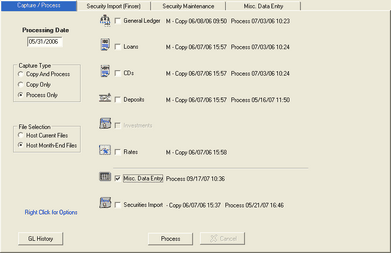
After entering items into the Misc. Data Entry section, processing is required.
|
|
||||||||
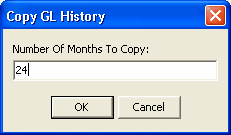
Since a new interface has been established, GL history should be recaptured for the maximum amount of months (24).
|
|
||||||||
|
|
After completion, you will also need to process Adv. Income & Adv EVE to display correct results
MAINTENANCE
MONTHLY MAINTENANCE
The Book Value & Yield of the instrument must be updated each time the system is run since this is the starting point for the paydown.
The Next Payment field does not have to be updated, since the system will compute the next appropriate payment date based upon the payment frequency and the current capture date.
Remove balloon dates that are prior to the processing date. Update Call dates where applicable. |
|||||||||
UPON PAYOFF:
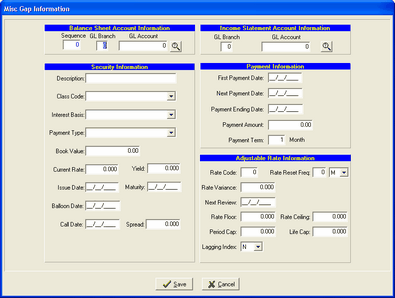
The item will need to be deleted when it is paid off. To delete,
|
|
||||||||