In order to obtain various balances for the Liquidity reporting, components of a ratio will need to be connected to the appropriate accounts in the chart of accounts. The components needed for the ratios where established by FinSer. The institution must define the accounts the component is to obtain balances for in the calculation of the various ratios.
The Liquidity and Dependency ratios share various components, but are separate from the Sources and Uses components. In order to organize the components, all Liquidity and Dependency components are prefixed with LQ-, the Sources and Uses components are prefixed with SU-
FinSer has established the proper balance option parameters for each standard component. Balance Options for standard components established by FinSer cannot be changed by the user. To customize, one must add a new component.
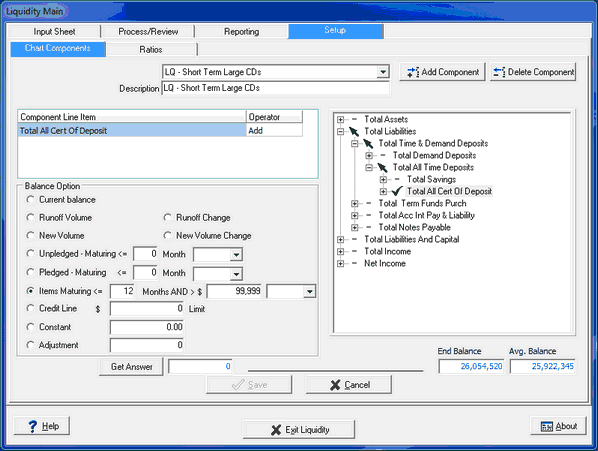
Description (Component) - Select the component from the drop down box or enter a new component by selecting the Add Component function.
Component Line Item - This box will display the line item G/L accounts, subtotals, or totals selected from the tree view from the right side.
Balance Option - This area is predefined based on the Component selected in the drop down box.
Current Balance - The system uses the component's item current balance.
Runoff Volume/New Volume - This balance option is used in the Sources and Uses ratio.
Runoff Change/New Volume Change - This balance option is used in the Sources and Uses ratio. Application volumes will have two components set up, one using the Runoff Volume Change and another using the New Volume Change option. Non-application items will typically only appear once.
Unpledged-Maturing - This balance option is used for securities and misc. data components. Only unpledged volumes will be considered. An additional Month parameter is used to determine the less than or equal to month. By entering a large number in the Month field, it will include all maturing items. The selection box to the right is to designate the type of securities (HTM, AFS, or both HTM/AFS)
Pledged-Maturing - This balance option is used for securities and misc. data components. Since the institution may pledge portions of their security inventory to depositors to satisfy their deposit requirements, those volumes can be subtracted from the total volatile liabilities. By entering a large number in the Month field, it will include all volumes of pledged securities regardless of their maturity. The selection box to the right is to designate the type of securities (HTM, AFS, or both HTM/AFS)
Items Maturing - This option is was initially designed for CD's. (The theory is that Jumbo CD's are considered particular volatile and should be counted separately.) It can also be used for securities. The selection box to the right is to designate the type of securities, if defining securities (HTM, AFS, or both HTM/AFS)
Credit Line - This is used in the Sources and Uses ratio. This allows the institution to specify any available credit line it could draw on if needed.
Constant - A constant amount can be added for calculations
Adjustment - An off balance sheet adjustment can be designated. This will appear on the Input sheet under the Adjustments section and manually updated
Get Answer - Displays a result of the applied parameters selected for the Balance Option
Ending Balance/Average Balance - This is the Ending GL Balance and Avg GL Balance of a highlighted account