 Main Menu | Reporting | My Reports | Select Report (Budget group) and Edit
The Budget Simulation Volume & Reinvestment Summary report will assist you with budget preparation. This report gives you a fiscal year view, whether current or next year, displaying volume assumption detail for runoff and new volume with associated rates for a selected budget simulation. It also gives a Total 12 Month increase amount and % along with the average monthly increase volume, the average runoff rate and the average new volume rate.
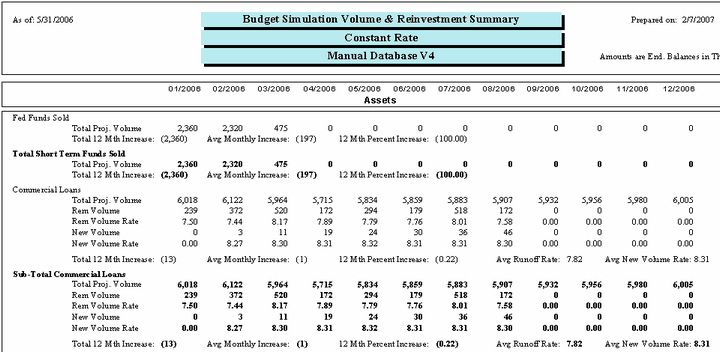
The Budget Simulation Volume report can be configured through the Edit option of the My Reports tab to provide different views. The following screen displays the system parameters that can be customized by the bank.
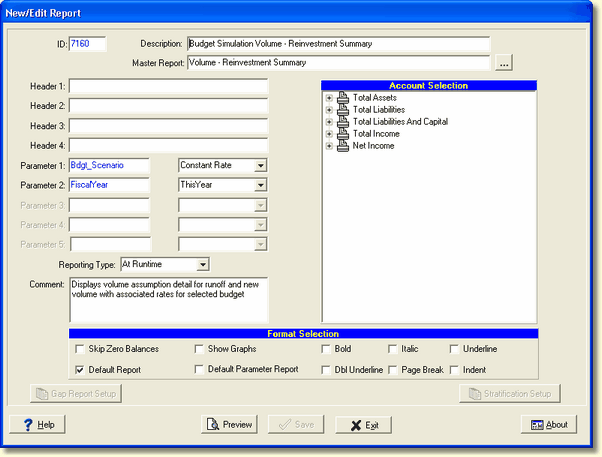
There are two system parameters as well as the reporting type for these reports which can be changed by the user:
Parameter 1: Bdgt_Scenario - Options are the budget simulations you have set up. If you change this parameter, you may need to change the report description and header to show the appropriate title for the data you're using.
Parameter 2: FiscalYear - Select ThisYear or NextYear. If you change this parameter, you may need to change the report description and header to show the appropriate title for the data you're using.