 Main Menu | Reporting | My Reports | Select Group Filer (Budget group) and Edit
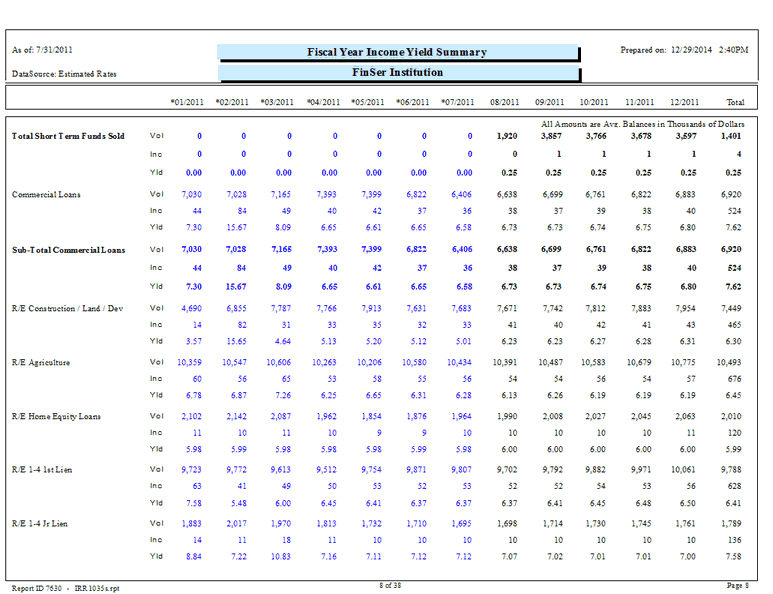
The Budget Simulation Fiscal Year Income - Yield Summary report provides a view of balances with associated yields and incomes for the balance sheet and a selected simulation. Reports can be configured for each of the seven budget simulations.
Two different reports are available: Current Fiscal Year, Next Fiscal Year.
The following screen displays the system parameters that can be customized by the bank.
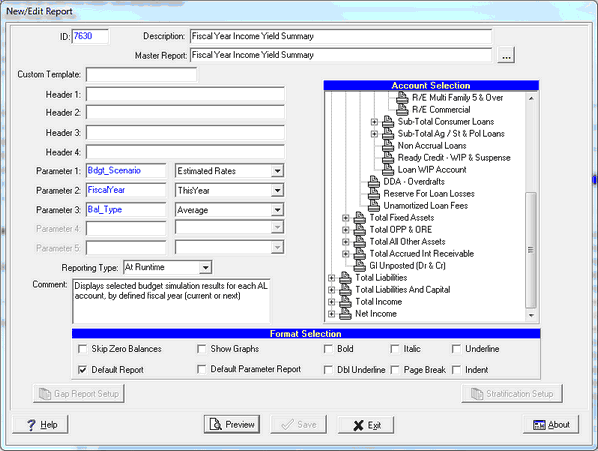
There are three system parameters for these reports which can be changed by the user:
Parameter 1: Bdgt_Scenario - Options are the budget simulations you have set up. If you change this parameter, you may need to change the header to show the appropriate simulation you're using. The report also displays the data source in the upper left hand corner which shows the simulation used for the report.
Parameter 2: FiscalYear - Options are ThisYear or NextYear. If you change this parameter, you may need to change the report description and header to show the appropriate title for the data you're using.
Parameter 3: Bal_Type - Select Average(Avg.) or Ending(End.). This parameter pertains to the balance sheet side of the General Ledger. The Income side will always use ending balances. The report will print which balance type you have selected in the upper right hand area, above the date columns.
Actual data is shown in blue; projections are shown in black.
The yields calculated are based upon the interest basis of the items contained in the account as well as the reinvestment calculated on an Actual/Actual interest basis by default.
The yield basis of an account can be set in the Parameter Setup / Chart of Accounts section and will then override the default interest basis for reinvestments.
The Total column is a simple average of the 12 month balances and yields.