 Main Menu | Budgeting| Assumptions | Index Rates
The rate assumptions in the Budgeting module are set by period instead of by shock scenario, therefore, this topic will be separate from the Advanced Income Shock and Advanced EVE Rate Assumption Methods topic.
When the assumptions to be made are some form of rate assumptions, additional interface features are available.
Base Index
Any rate assumption can be based upon a specific index. Changes in the index will flow automatically to assumptions based on the base index. This will save time updating your rates. This only applies to Spreads and Percent. It does not apply to the Value option. If you have entered rates based on the Value option, the rates will not change, you will need to manually review and change those rates.
The indices available for the base index are those that have been setup, i.e. have been provided with rate assumptions in the various time periods, under the Index Rate tab.
In the Reinvestment tab select from list of indices in the Base Index drop-down box. This causes the effective rates for this index to be placed in the Base column of the rate assumption grid.
Rate Assumption Methods
The system uses three methods to set the rate assumptions.
Spread - This method assumes that the rates in each time period will be based upon a spread to the current effective rate.
Percent - This method assumes that the rates in each time period will be based upon a percentage of the current effective rate.
Value - This method assumes no relationship necessarily between the rates in each of the shock scenarios and the current effective rate. Rather, it allows you to input the actual rate into each of the shock scenarios.
A more detailed explanation of the three methods is shown below:
Spread
When the Spread radio button is selected the screen below is displayed.
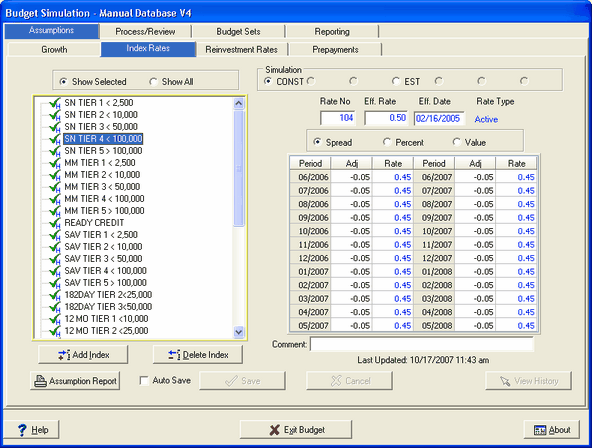
Adj. Column - This is an input column. The values entered into the Adj. column of the rate assumption grid are considered a spread in percentages that are added to the Base index to derive at the final rate used as the assumption. The adjustment the user enters will be rounded to two decimal places. An example of this is shown in the above screen shot.
Rate Column -This column will illustrate the effect of using the spread that you input on the index. It is a "read-only" line; you cannot input directly to any of the cells in the Rate column.
For instance, if the effective rate for SN Tier 4 Index Rate falls 25 basis points to .25%, the next time data capture is performed, the system will keep the same spread in all time periods, and will recalculate the rate in the time periods to be .20. Unless you have a need to change the spread relationships, there will thus be no need to re-enter any data.

One of the efficiencies of the IRR system is that it "remembers" these inputs. In other words, the spreads that you input will remain in effect until you change them, even if the effective rate coming from the host system changes.
When using the spread method, the possibility exists that negative rates, which will be in red and bold, are created if the host rates dropped from one month to the next and the spread was not adjusted as shown below in the Reinvestment tab.
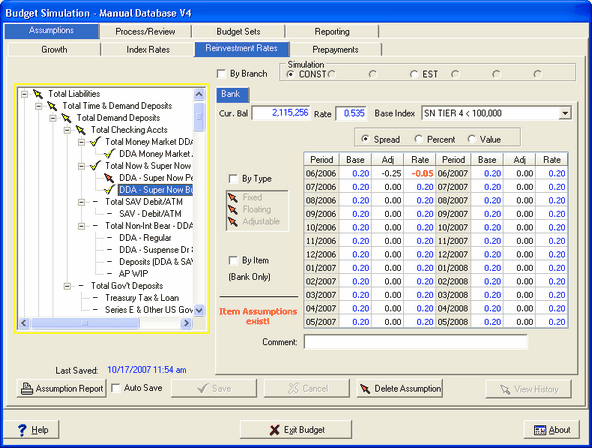
The system will highlight such a condition by showing the final negative rate in red. See the subheading No Rate Assumption and Negative Rates below for an explanation of the system defaults.
Percent
If you want to assume that the index rate will move as a "percentage" of the current effective rate as market rates change, use the Percent method, as illustrated below.
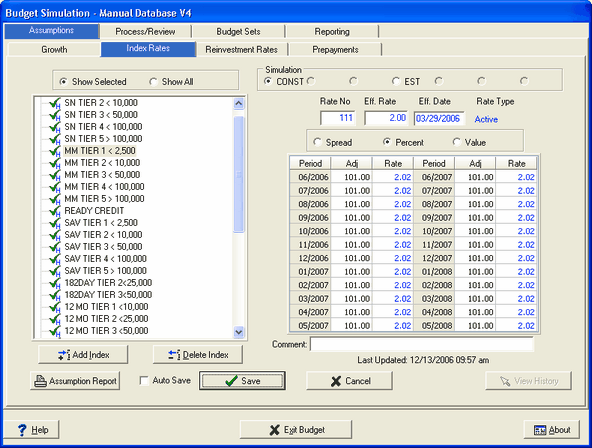
Adj. Column - This is an input column. The values entered into the Adj. column of the rate assumption grid are considered a percent of the base rate to derive at the final rate used as the assumption. The adjustment the user enters will be rounded to two decimal places. An example of this is shown in the above screen shot.
Rate Column -This column will illustrate the effect of using the percent that you input in the adjustment column. It is a "read-only" line; you cannot input directly to any of the cells in the Rate column.
For instance, if the effective rate for MM Tier 1 Base Rate falls 25 basis points to 1.75%, the next time data capture is performed, the system will keep the same percent in all time periods, and will recalculate the rate in that case to be 1.77. Unless you have a need to change the percent relationships, there will thus be no need to re-enter any data.
The example index rate above is the MM Tier 1 index. Rates related to demand or transaction accounts rarely move with the same frequency or to the same degree as the fed funds rate.
For instance, if the fed funds rate goes up 50 basis points, you probably will not move your rate on Money Market accounts up 50 basis points every time. It might be more realistic to use a percentage to set these kinds of indices in a rate shock environment.
As we noted, your institution may have a greater or lesser correlation to the Fed Funds rate than shown here for a similar index.
To assume that the index will not change, 100% is entered. But you might expect, perhaps in an extremely competitive deposit market, greater responsiveness in the NOW 1000 index as rates rise.
As in the "Spread" method, the system will retain the percentage assumptions to be used in the future, even when the current effective rate changes. The adjustment the user enters will be rounded to two decimal places.
And if the index is a manually created index, you can change the rate in the Eff. Rate field to make any adjustments to the current rate that you wish, and the system will adjust the figures on the Rate column based on the percentage in the Adj. column.
Value
To enter the rate assumption itself, rather than using a Spread or Percentage method, select the Value radio button.
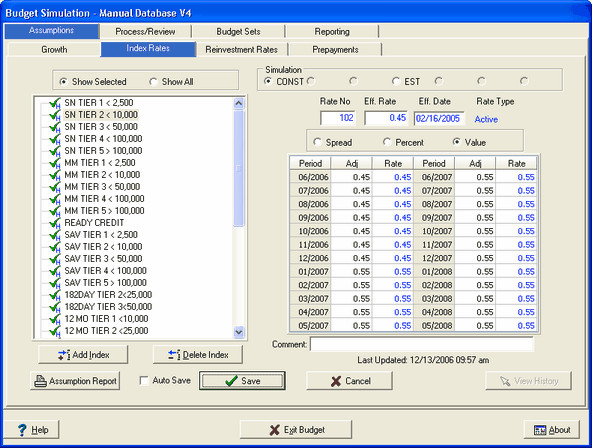
Using the Value method, the number in the Rate column changes to the same number that you entered in the Adj. column. The adjustment the user enters will be rounded to two decimal places.
As with the other methods, the system will remember the assumptions you make under the Value method and will retain them even when the current effective rate changes, either due to changes in the rates coming from the host system or to changes you make to the effective rate on indices that you have set up manually.
While this "memory" contributes to efficiency, it also makes it important to review these assumptions on a periodic basis. This is why the check mark- , preceding the index in the display will change to a question mark-
 , if the particular assumption has not been updated in three months.
In setting a value in the Reinvestment Rates tab would typically be used when the rate to be applied does not have any correlation to a driver rate.
For all three assumption methods, always remember press the Enter button after entering each cell change.
No Rate Assumption
When in the Reinvestment Rates tab, a no rate assumption on the account will default to a reinvestment rate equal to the average rate on the account (for interest bearing accounts).
Negative Rates
If assumptions entered by the user would result in negative rate assumptions to be applied, the system automatically changes those assumptions to a .01 rate during processing.
A visual highlight to the rates grids has been added to make negative rates more visible to the user. If the resulting rates are negative, they will be in Bold & Red. This can happen in the declining rate environment where the host rates have dropped and the existing spread or percentage causes a negative final rate. See an example in the Reinvestment Rates tab below: